One voice. Any language.

Voice turns into text in a fraction of a second.

Local, unlimited, and free Speech is recognized on your GPU. Data does not leak to the cloud.
AI translation into 198 languages with one button What you said instantly becomes text in the language you need.

Dictate and translate what you just said, plus text in photos. Watch videos, movies, streams, and calls with live translated captions. Summarize lectures, create meaning maps, and get simultaneous interpreting.

Available now: dictation, translation, live conversation translation, photos, documents, live captions, and transcription with summaries. Coming soon: calls with live translation and conversation maps.

Available for:
Dictator Desktop
Dictator Mobile
198 AI translation languages
Scroll down
Features

What Dictator can do

Eleven features in action: what each one does and how it looks in the app.

  1. 01Voice typing
  2. 02AI voice translation
  3. 03AI interpreter
  4. 04Phone translator
  5. 05Photo and screen
  6. 06Transcription
  7. 07Documents
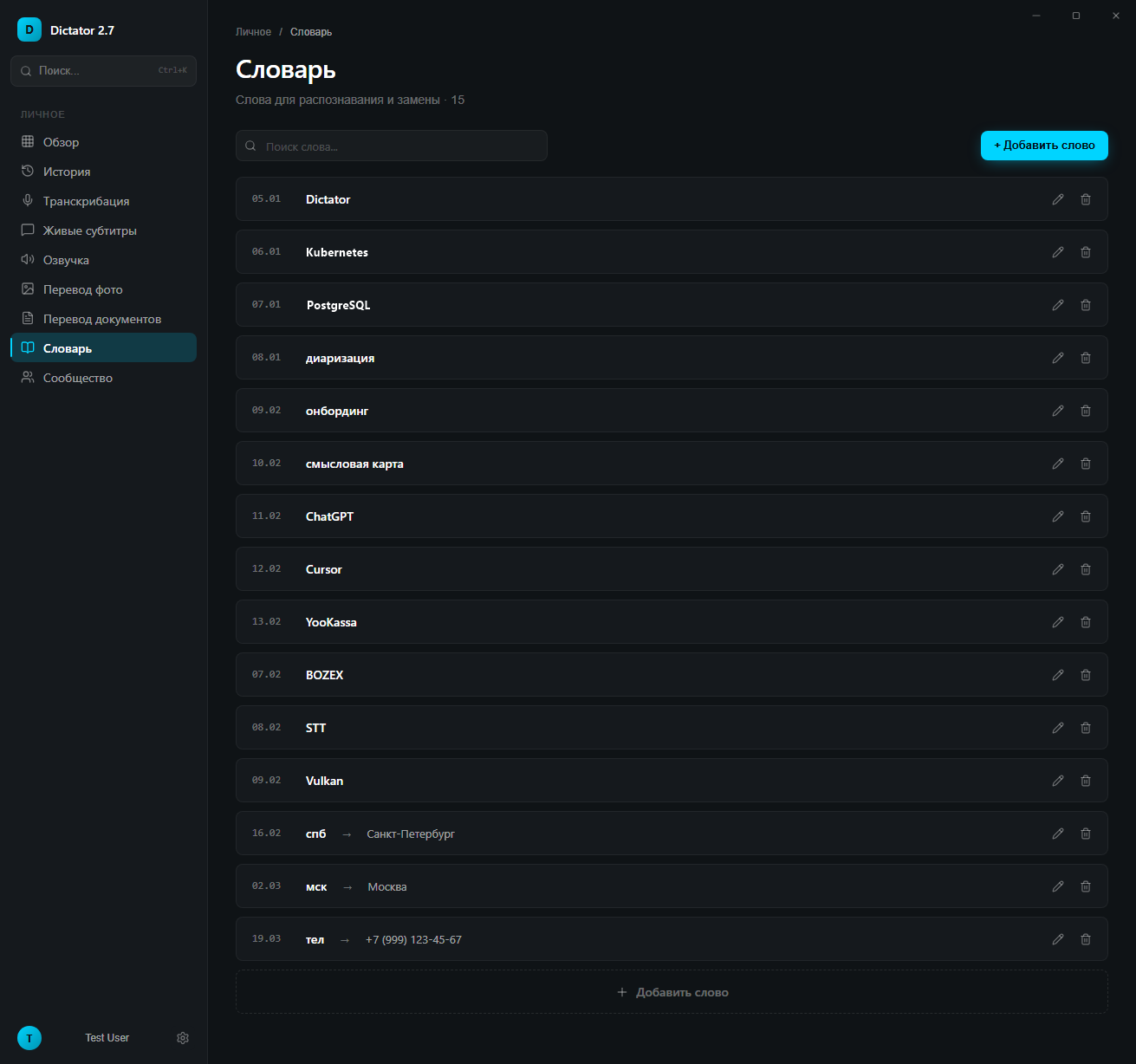
  8. 08Dictionary
  9. 09Read aloud
  10. 10Your own server
Feature01

Voice typing into any app

Press a key, speak, press it again. The text is already there. On a computer it is a hotkey, on a phone the mic on the Dictator keyboard.

Dictator puts the recognized text wherever your cursor is: an email, a chat, a document, a spreadsheet. A short phrase is ready in under a second. There is no limit on length.

  • The default hotkey is Ctrl+Win: the first press starts recording, the second stops it. You can also hold the key like a walkie-talkie.
  • Speech is recognized by a neural network. It runs on your own computer and understands 100 languages.
  • It runs on NVIDIA, AMD and Intel graphics cards and on Apple M1-M5 chips. On a Mac it is as fast as on a graphics card.
  • You can pause a recording. The cross cancels it, the check mark sends it.
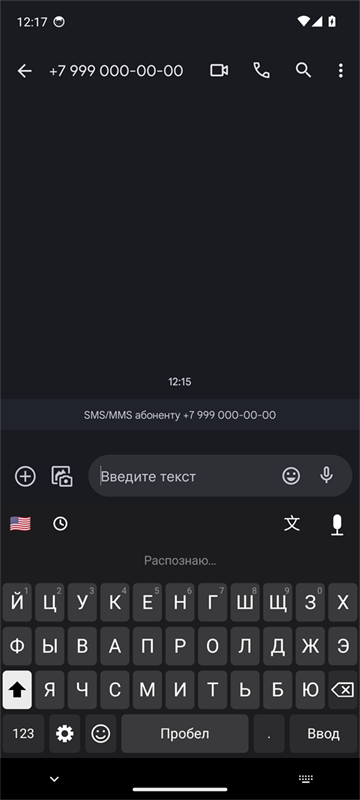
  • On the phone the Dictator keyboard works in any app: the mic sits above the letters, tap, speak, tap again, and the text is in the field. iPhone with iOS 15, Android with 7.0.
How recognition worksThe speech recognition model was trained on 5 million hours of recordings in many languages. Accuracy is above 95 %: in popular languages it gets fewer than 5 words in 100 wrong and handles accents and fast speech.
What the voice detector isThe voice detector built into Dictator. It tells speech apart from silence, noise and music and passes only the voice to the model. Fewer stray words in pauses, faster results.
Demo
Widget at rest: a thin bar at the bottom of the screen

Try it right here

Real widget screenshots
Widget on hover: Ready and the hotkey
Hover
Widget while recording
Recording
Widget paused
Paused
Widget: recognizing
Recognizing
On the phone: the Dictator voice keyboard
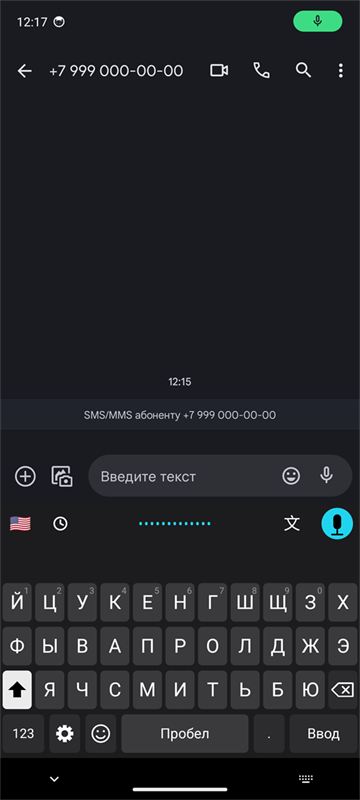
Dictator keyboard on Android while recording
Real screenshot: recording
Dictator keyboard: Recognizing
Recognizing
Feature02

Say it in English, get it in Chinese

Ctrl+Win+T on a computer or the 文 button on the phone keyboard: speak your language, the translation lands in the field.

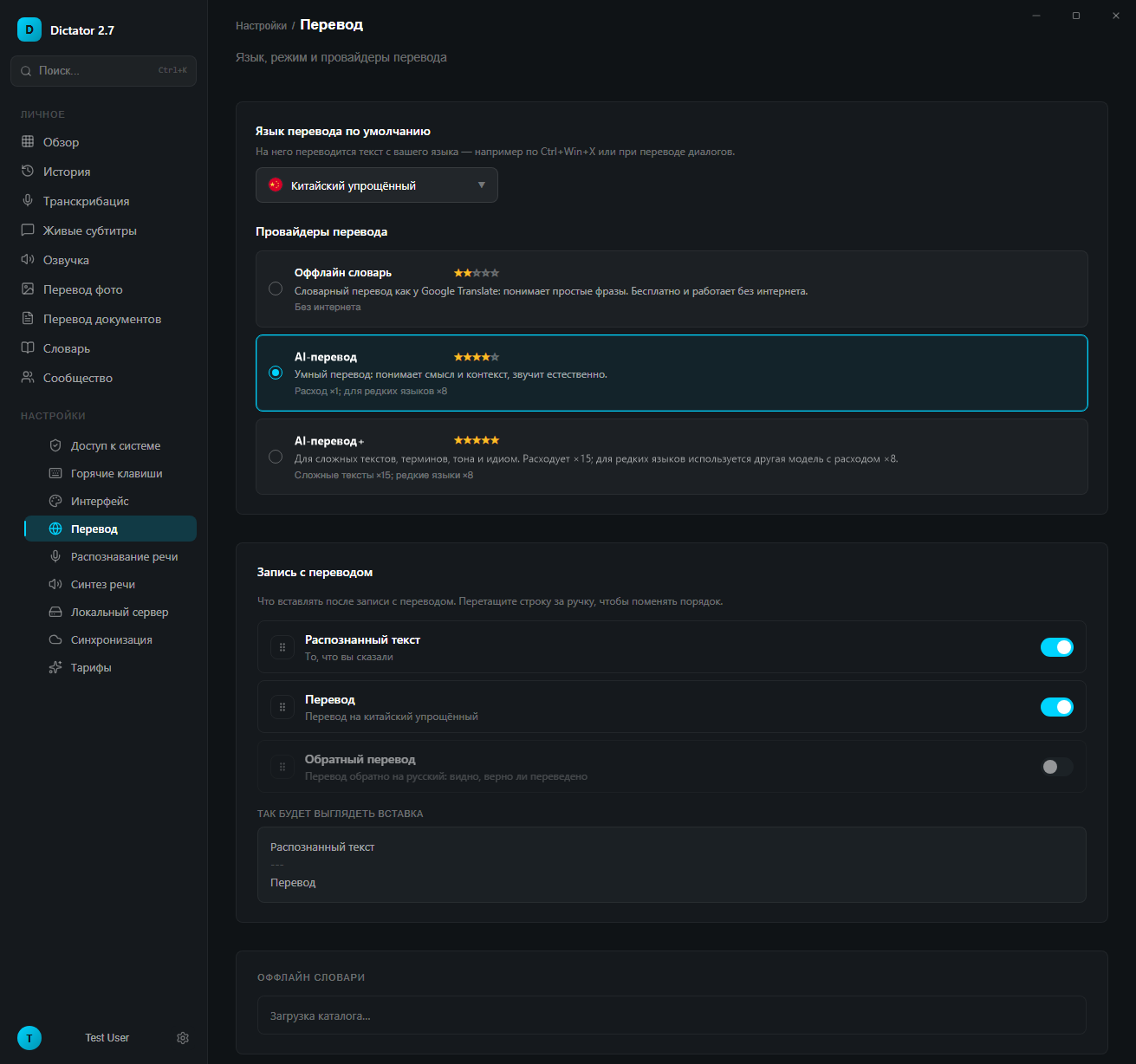
In translation mode the widget shows the target language flag. Click the flag to pick another language. You can paste the translation, what you said and the back-translation in any order.

  • Offline translation into 45 languages. Free and without internet: dictionaries run right on your computer and phone.
  • AI translation into 198 languages. The AI translates the meaning of the whole phrase, not word by word, so you are understood exactly. Quality is the same on every plan, only the volume differs.
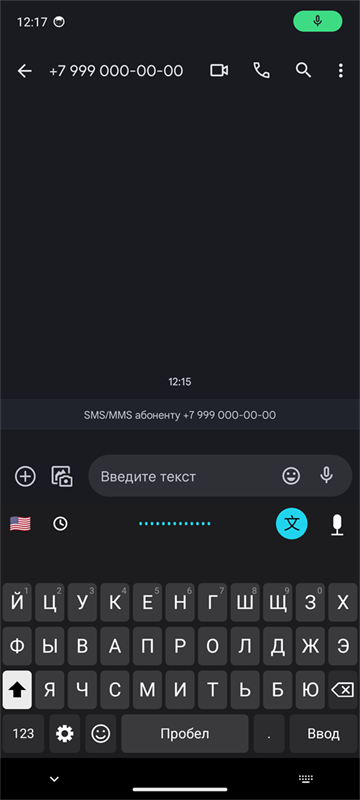
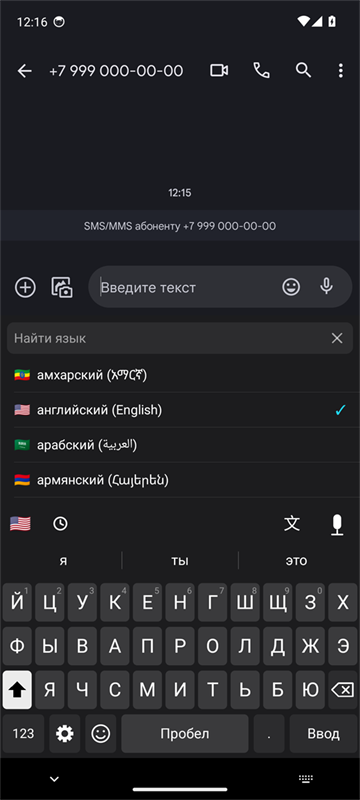
  • On the phone the 文 button on the keyboard records your speech and inserts the translation, the flag on the left picks the language. With text selected, the same button translates the selection.
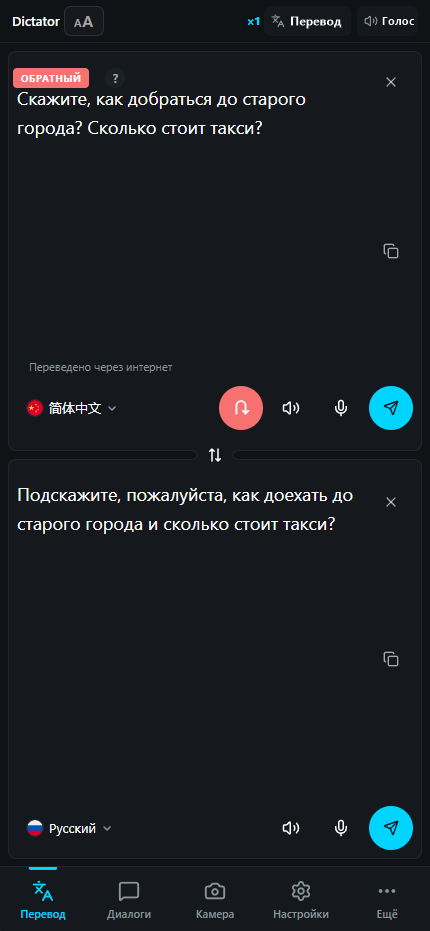
  • Back-translation. Dictator translates the result back into your language and shows it alongside. You can see at once whether the meaning came through, even if you do not know Chinese.
ModeLanguagesInternetPrice
Offline translation45not neededfree, unlimited
AI translation198needed15K characters free, up to 10M on paid plans
Demo
Widget at rest: a thin bar at the bottom of the screen

Try it right here

Real app screenshots
Widget in translation mode with the Chinese flag
Widget: recording with translation
Translation settings: what to paste, translation and back-translation
Settings: what to paste
On the phone: translation from the keyboard
Dictator keyboard: recording with translation
Real screenshot: recording with translation
Picking the target language by flag
Language by flag
Feature03

An AI interpreter instead of a human one

You speak your language, the other person hears theirs. And back. AI translation carries the meaning, so you are understood exactly.

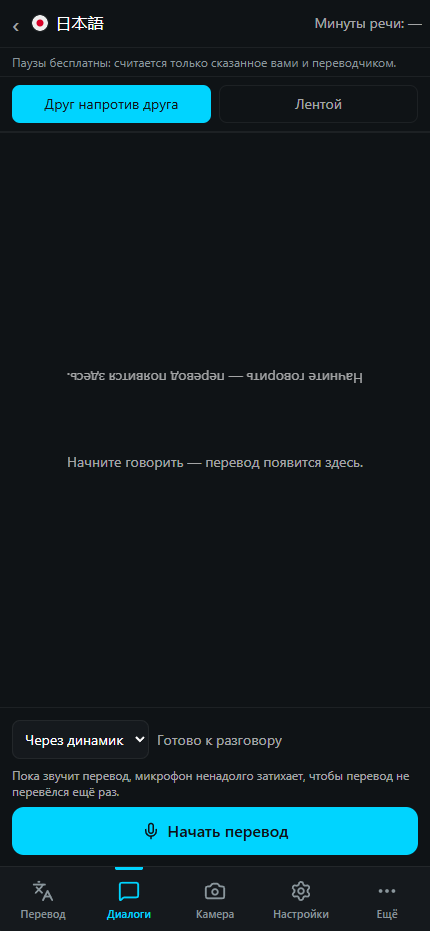
One and a half to two seconds from the start of speech to the spoken translation. The AI interpreter translates continuously and by voice, by the meaning of the phrase rather than word by word. For negotiations, travel, a doctor, talking to family abroad. Put the phone between you, each person gets their own half of the screen.

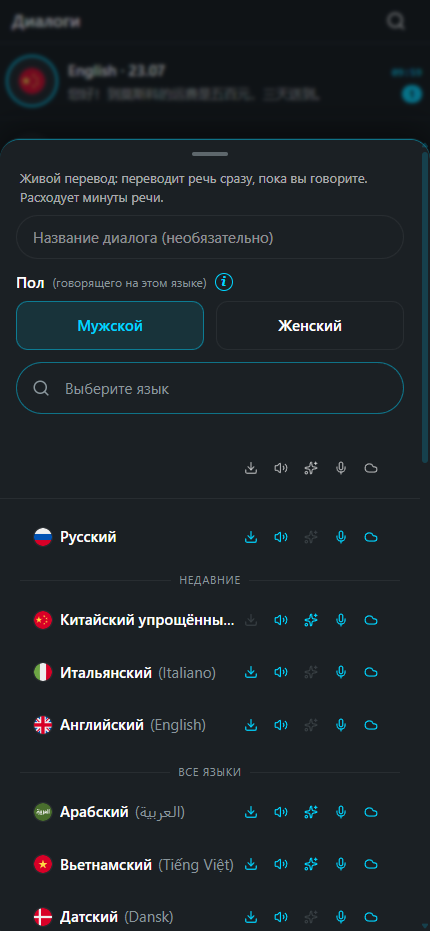
  • Understands speech in 60-70 languages, translates by voice into 13-29 languages and with subtitles into 60. The exact number depends on the translation model you choose.
  • The delay is the same on every plan, free minutes included. The translation can be voiced in a voice similar to yours.
  • Modes: speakerphone, headphones, push to talk, subtitles only.
  • 3 minutes free, 10, 30 and 60 minutes a month on paid plans, extra minute packs available.

Try it right here

Live translation on the phone: choosing the language and the other person's voice
Live translation: the screen is split between the two speakers
Feature04

Translator and conversations on your phone

Text, voice and a conversation with a foreigner in one app.

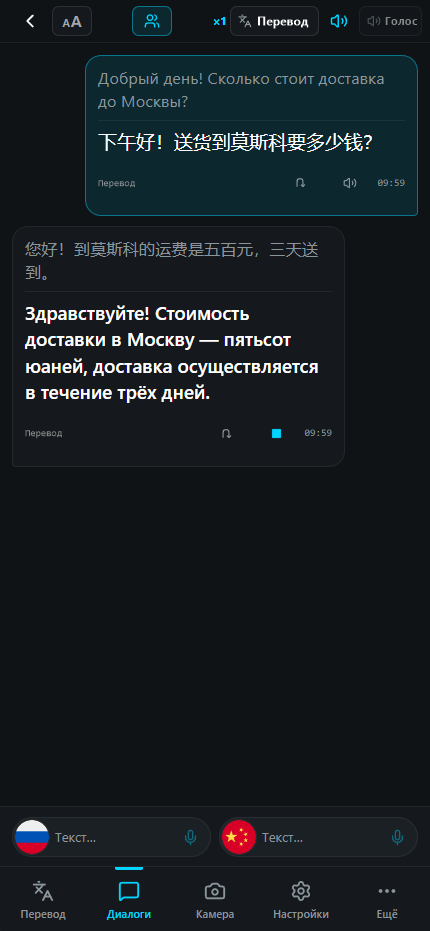
Say or type a phrase: AI translation carries the meaning and the app reads it aloud. The Conversations tab shows who said what, and the conversation is kept in history.

  • The back-translation button shows how the translation reads in your language: you check the meaning in a second.
  • Languages are picked by flag, recent ones always on top.
  • The translation is read aloud: a standard voice for free, neural voices on paid plans.
  • One account on phone and computer: shared history.
A translated conversation on the phone
Back-translation on the phone: Chinese translated back into Russian
Feature05

AI translation of photos and the screen

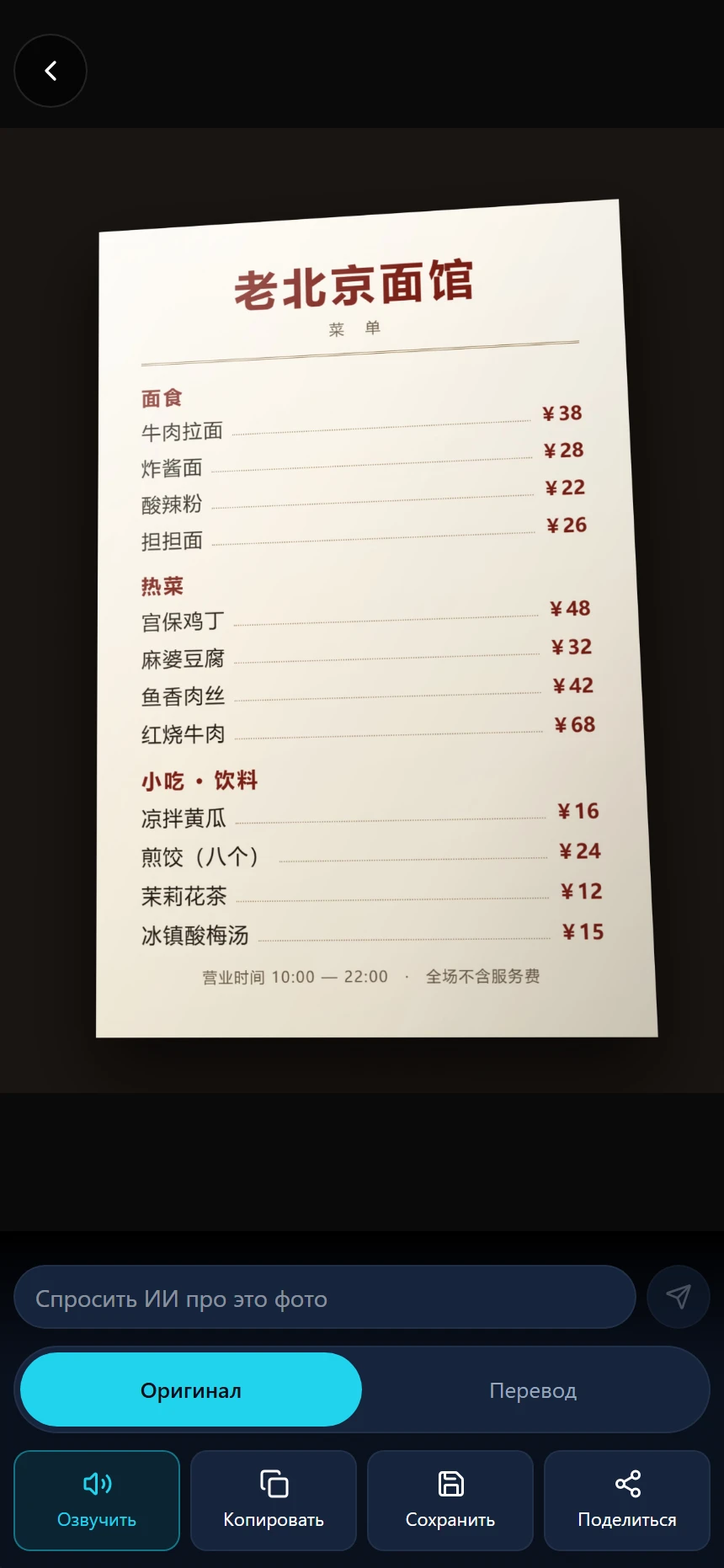
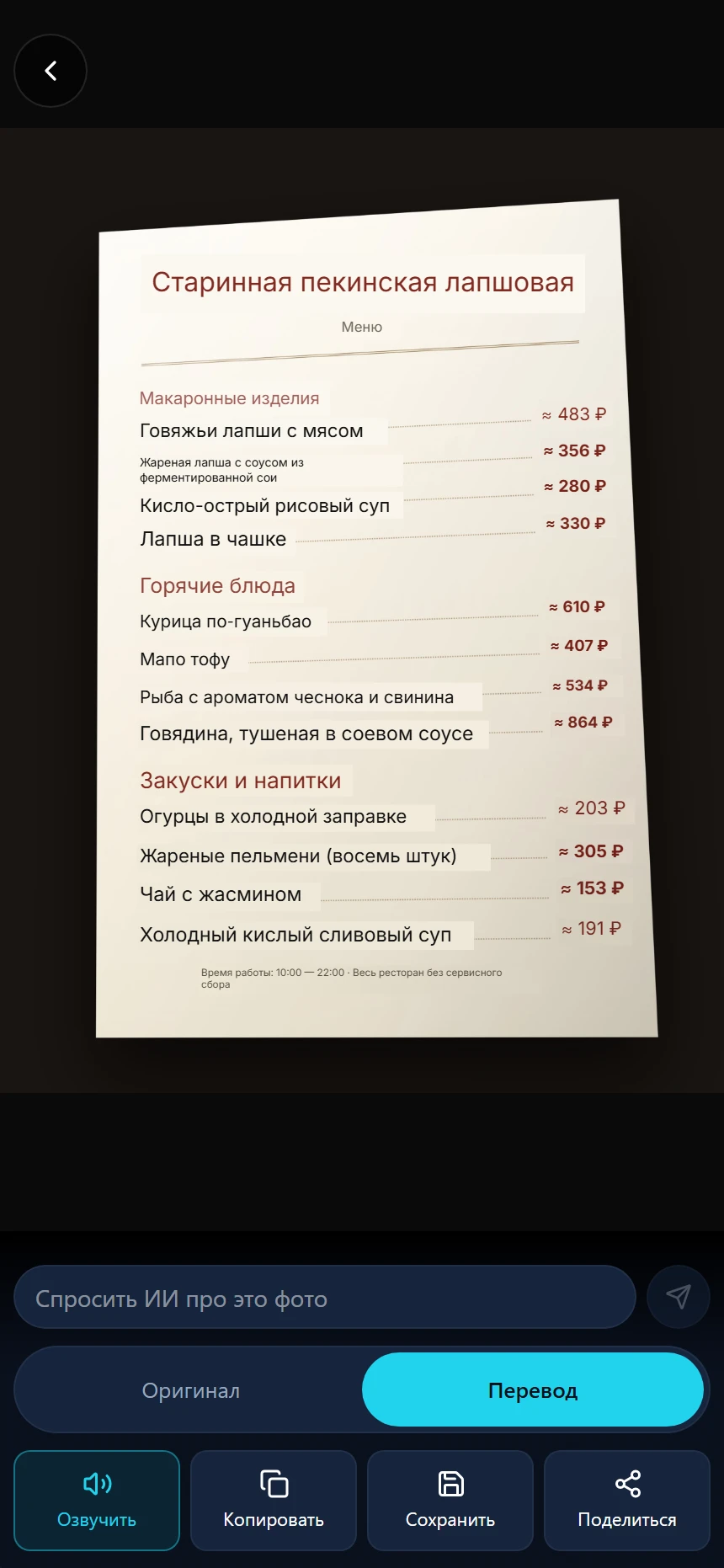
A menu, a sign, a contract, a screenshot. The translation sits on top of the original.

On the phone the camera translates on the fly, and so do photos from the gallery. On the computer press Ctrl+Alt+W: select an area of the screen and get the translation. A game, an app, a picture where text cannot be copied.

  • Live camera and photos from the gallery.
  • A screen area on the computer is recognized right on it.
  • You can ask AI about a translated photo: what this dish is, what the fine print says.
A photo of a menu in Chinese
The same menu with the translation laid over the original
Feature06

Transcribe meetings, lectures and interviews

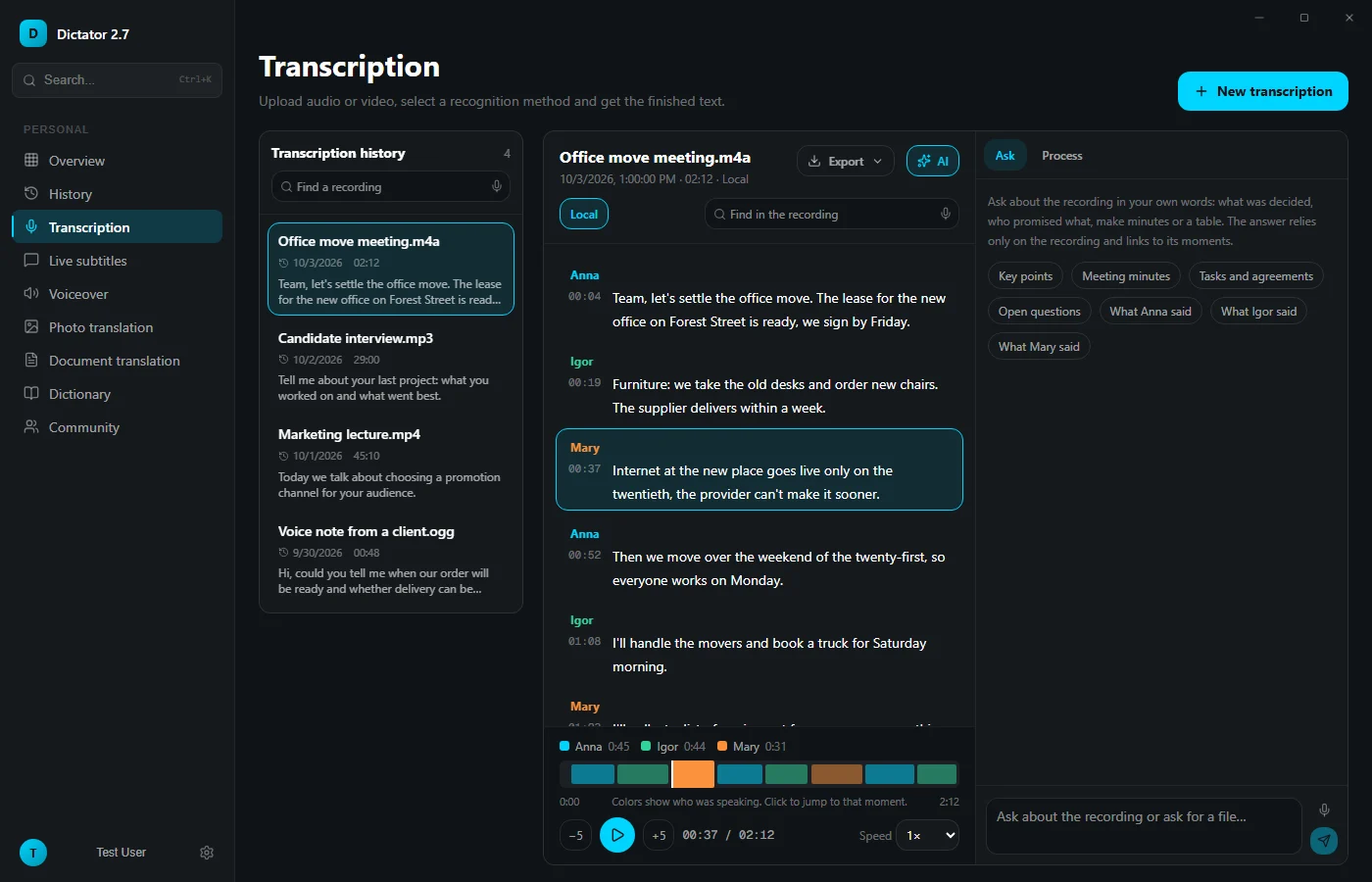
Upload a recording or a YouTube link. Get the text split by speaker.

MP3, WAV, WebM, MP4, MOV, MKV. On your computer transcription is free, with speakers told apart.

  • Rename speakers, add timestamps if you like.
  • AI writes a short summary, removes filler words, rewrites the text in a business style or by your template. Every version is kept separately.
  • On Windows, export to Word, PDF, SRT and VTT subtitles, TXT, Markdown and CSV; on a Mac, to TXT and Markdown.
Transcription
A recording transcribed into three speakers with timestamps
Feature07

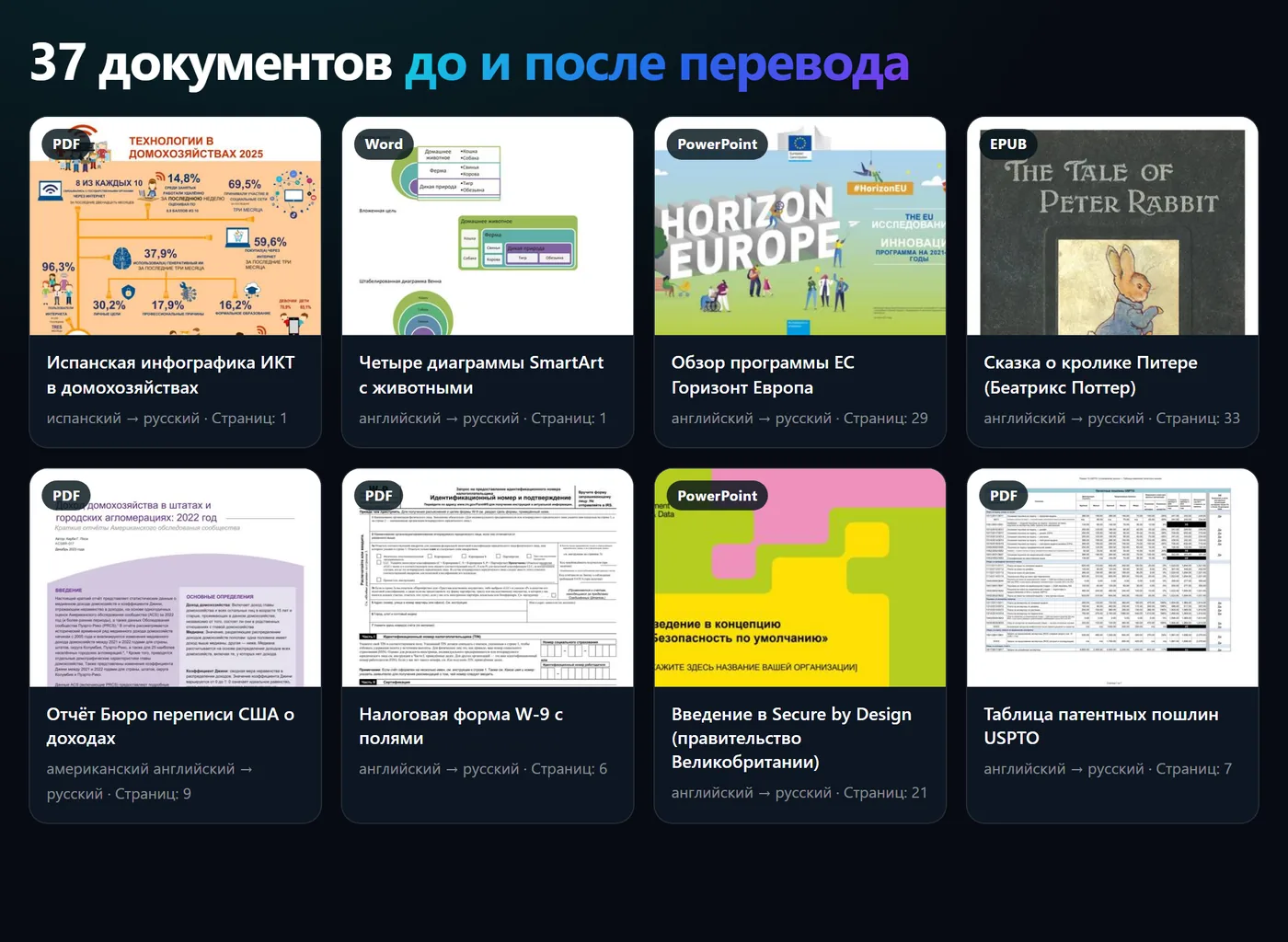
Translate documents and keep the layout

PDF and scans, Word, Excel, PowerPoint, EPUB, HTML and plain text.

Tables, headings and lists stay where they were. Compare the original and the translation line by line.

  • Formats: PDF, DOCX, XLSX, PPTX, EPUB, HTML, MD, CSV, TXT.
  • 3 documents a month free, 10 and 50 on paid plans, unlimited on Premium.
Feature08

Dictionary and quick replacements

Your names and terms are spelled right, a short phrase expands into ready text.

Add a client surname, a company name or a term to the dictionary. Dictator hints it to the model before recognition. With a template you say a short phrase and a long one is pasted: a signature, company details, a reply to a client.

  • A dictionary word can be replaced with a different spelling right away.
  • 10 words and 10 templates free, 30 on Basic, unlimited on Pro and Premium.
Dictionary and templates
Dictator dictionary
Feature09

Reads text aloud in a natural voice

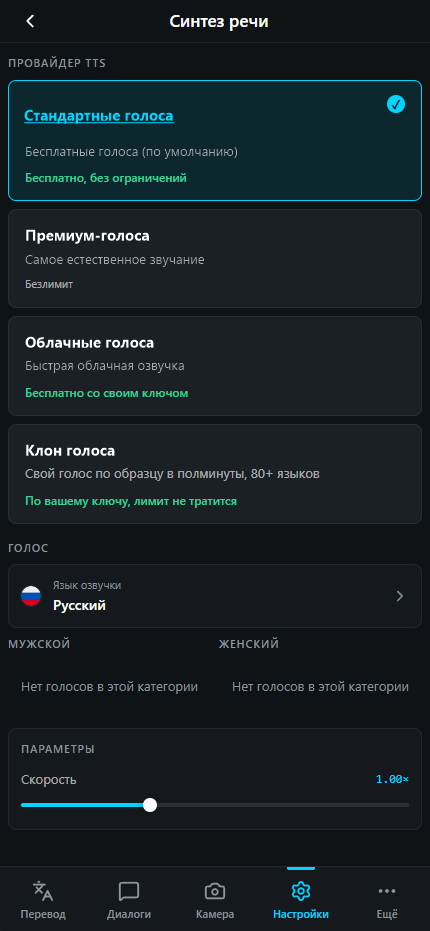
A free standard voice in 58 languages and studio-quality neural voices.

Voice a translation, an article, your own text. The sentence is highlighted as it is read.

  • Free and unlimited: the standard and the system voice.
  • On the computer, offline: a light voice with almost instant first sound, and a high-quality voice on the graphics card.
  • Studio voices: cloud neural networks with natural intonation.
  • A clone of your voice on Premium.
Choosing a voice
Feature10

Your own recognition server for a team or family

One computer at the office or at home recognizes speech for everyone.

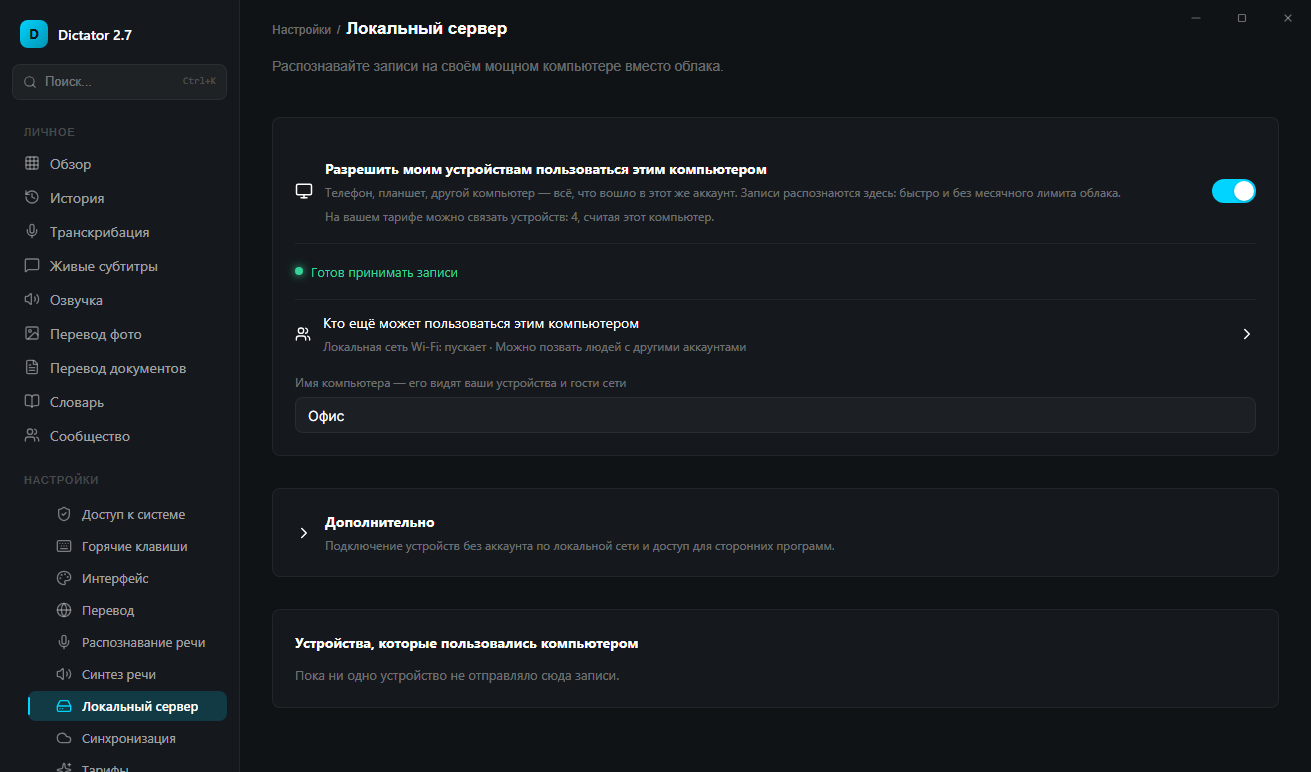
Set up a free shared server: it is simply your computer with Dictator, no separate server needed. Invite people by email, code or link. Phones and weak laptops get the recognition quality of a powerful graphics card.

Everyone recognizes speech fast, accurately, for free and privately.

  • 2 people free, 4, 10 and 25 on paid plans.
  • Recordings never leave your network: lawyers, doctors and sales teams value that.
Local server
Local server: let my devices use this computer
Right there in recognition settings
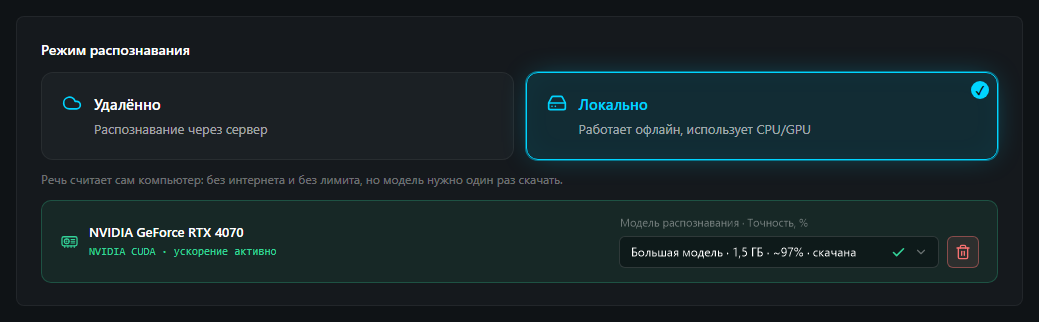
Recognition mode: Local is selected, an NVIDIA GeForce RTX 4070 does the work, the recognition model is downloaded
Recognition runs locally, on this computer’s graphics card

And also

Translate selected text

Select text on a site or in an app, press two keys — the translation appears next to it. Nothing to copy, no translator to open.

Removes the “um” and adds commas

Live speech turns into tidy text: no filler words, proper capitals and punctuation. It can be shaped into a letter, a note, or a message right away.

Saves to files

Text, translations, and subtitles are saved as files — open them in Word, in your notes, or attach them to a video.

A weak laptop asks your home computer for help

On the road your laptop hands the recording to your home computer — it is stronger and finishes faster, and it costs you nothing. The recording stays between your own devices.

Voice turns into finished work.

Dictator listens, translates, and turns meaning into text, captions, summaries, and maps.

Dictator desktop interface Dictator floating voice widget
198 AI translation languages
01

Dictate

Speech is recognized by a neural network. It knows more than 100 languages with around 99% accuracy on everyday speech: accents, rare names, and difficult words included. It runs right on your own computer — no internet, no subscription, no limits: the recording never leaves your machine.

02

Translate

It translates by meaning, not word by word — like a person who knows both languages. Politeness, jokes, and tone stay intact.

03

Use the result

Available now: dictation, translation, live conversation translation, photos, documents, live captions, and transcription with summaries. Coming soon: calls with live translation and conversation maps.

Live session RU -> EN

00:14 Dictator recognised the speech and kept the context.

00:18 The translation is ready, with the tone intact.

00:24 A summary and a map of key points come next.

100+speech recognition languages
GPUlocal GPU processing
5platforms
Dictator history screen

Recognition History

Dictator settings screen

Settings

Dictator translation settings screen

Translation settings

Motion system

One voice moves through layers: text, translation, meaning.

An experimental flow presents Dictator as a sequence where each panel reveals a new result.

Features
Speak — text appears

First, Dictator hears the speech.

Speech is recognized by a neural network. It knows more than 100 languages with around 99% accuracy on everyday speech: accents, rare names, and difficult words included. It runs right on your own computer — no internet, no subscription, no limits: the recording never leaves your machine.

Translates into 198 languages

Then it carries the meaning into another language.

It translates by meaning, not word by word — like a person who knows both languages. Politeness, jokes, and tone stay intact.

A short retelling of a recording

Then it turns the conversation into an outcome.

A lecture or a meeting becomes a short summary: the main points, what was agreed, and what needs doing.

Everyday workflows

Stop taking notes — use the result

Dictator handles the jobs you repeat all day: type by voice, shape prompts faster, and keep private work local.

Any input field

You talk — text appears in any app

Email, messengers, CRM, Notion, Cursor, ChatGPT, and browser forms: press a hotkey, dictate, and Dictator inserts text where your cursor is.

Now: dictation into the active field · Very soon: smart formatted insert
Prompts and writing

Dictate prompts without touching the keyboard

Say the idea naturally, and Dictator cleans speech, removes filler words, and shapes it into a prompt, email, note, task, or working text.

Very soon: Clean, Writing, Notes, Message, and Code modes
Privacy

Local and safe by default

Local recognition and GPU processing run on your computer. Cloud engines or LAN GPU are explicit choices when you need them.

Now: local models · local HTTP API · LAN recognition
Already in the app

Live captions over any window

Dictator listens to your computer audio and shows the speech as text together with its translation — over a movie, a call, a lecture, or a video in the browser. Nothing to set up inside those apps.

  • Original and translation at once Two tracks stacked or side by side in two columns. Font size, number of lines, and background opacity adapt to your screen.
  • Never in the way Drag and resize the bar, or let the mouse pass straight through it — clicks land in the player or the meeting window.
  • Local, on your own GPU Speech is recognized on your computer. Movie audio and work calls never leave for the cloud.
A movie frame with the caption bar floating above it Live caption bar: original speech on top, translation below
A movie. The speech as it sounds on top, the translation below.
A video call window with the caption bar floating above it Live caption bar in two columns: the speaker on the left, the translation on the right
A call. The speaker on the left, the translation on the right.
  • Choose the pace “Fast” shows text almost instantly, for a live conversation. “Calm” waits about a second but never rewrites a line — best for movies and lectures.
  • Every session is kept The transcript of a lecture or a call stays in the archive: search across all sessions and inside one, jump by timeline, separate speakers.
  • Your microphone as a second track In a meeting with a foreign speaker you see both sides of the conversation, and the translation can also be read aloud.

Movies and series

An audio track with no subtitles turns into translated captions right over the player — in any service and in a downloaded file.

Calls and meetings

Zoom, Teams, Meet, Telegram: hear the other person and read the translation. No bots in the room — your computer makes the captions.

Lectures and webinars

Watch and read at the same time, and the transcript of the class stays in the archive so you can find any moment later.

YouTube, streams, podcasts

Any sound playing on the computer — including live broadcasts, where ready-made subtitles never exist.

Live captions run in the desktop app: Windows and macOS 13 and newer. One hotkey turns them on — and the same one turns them off. On the computer they are free, with no minute limit.

198 AI translation languages
100+ speech recognition languages
5 platforms
GPU local GPU processing

What we are building next

Roadmap

Features coming soon and what already works in the app

Coming soon

Calls with live translation

Call a partner abroad or your family: everyone speaks their own language and hears the other person in theirs.

Conversation map

Topics and decisions from a meeting come together in one clear picture that shows how the parts connect.

Already available

  • Voice typing into any app, 100 languages, recognition runs on your computer
  • Translation into 198 languages, 45 of them free and offline
  • Photo and screen area translation
  • Live translated subtitles over calls and movies
  • Live conversation translation on your phone
  • Transcription of recordings with speaker separation and a short summary
  • Document translation that keeps the formatting
  • Your own computer recognizes speech for your team or family

See in action

Explore the application interface for Desktop and Mobile

Desktop (Windows / macOS)

Recognition history

Recognition History

Main screen with history of all dictations. Search by text, play recordings, and quick access to results.

Settings

Settings

Full control over the application: hotkeys, choice of translation languages, microphone settings, and API key.

Dictionary

Dictionary

Add complex words to improve recognition: proper names, brands, professional terms.

Templates

Templates

Create text templates for quick insertion: greetings, signatures, standard replies.
Dictator floating widget

Floating widget

A compact recording panel over any app: dictate text, a prompt, or a note and insert the result where your cursor is. In the way? Hide it in settings — the panel will show up only while you record.

Mobile (iOS / Android)

Main screen

Translation

Main screen: type or dictate text — instant translation between any languages with spoken output.

Settings

Settings

Entering the API key to activate the application and choosing the preferred interface language.

Translation settings

Translation settings

Choose offline dictionaries and AI translation with clear limit usage.

Interface settings

Interface

Theme, app language, and screen behavior for your workflow.

Conversation translator

Dialogue Translator

Live translation mode for negotiations. Speak in your language — the interlocutor hears in theirs.

Conversation chat

Translation chat

Messages, translation, and conversation context in one live dialogue.

Profile

Profile

Account, plan, and linked sign-in methods in one place.

Photo translation — before

Photo Translation

Take a photo of a menu, sign, or document in any language. AI will recognize the text and show the translation.

Photo translation — after

Translation Result

Translation is overlaid directly on the image. Read documents and signs in your own language!

Download Dictator

Version 2.7.40

Desktop

Windows

Installers for Windows 10/11

Windows 10+ 64-bit

macOS

Application for Apple Mac

macOS 12+ Intel / Apple Silicon
How to install on Mac

Linux

AppImage and .deb package

Ubuntu 24.04+ x86_64 / ARM64

Mobile

Android

APK files for direct installation

Android 8+ ARM64

Dictator Pricing

Everything that runs on your own computer is free and unlimited. Paid plans add cloud neural networks, and they differ only in volume.

Free forever

Runs on your own computer — with no limits

Use this as much as you like: the work is done by your device, not by our servers. No internet and no account needed.

  • Speech recognition on your own graphics card — as many hours as you want
  • Voice typing into any program and any field
  • Translation without internet — 45 languages
  • Reading aloud: 119 standard voices and your system voices — no limits
  • A recording can be handed to your home computer — it transcribes it for free
  • Recordings, dictionary, and templates stay on your device

What you pay for: the volume of cloud neural networks

Cloud neural networks run on our servers and cost money. Your plan gives you tokens for the month, and you can spend them on any cloud feature. Each row below shows what you get if you spend all of them on that feature alone.

What it uses up Free Basic Pro Premium
Price 0 ₽ / mo 390 ₽ / mo 890 ₽ / mo 1 990 ₽ / mo
1 000 20 000 46 000 100 000
— ≈ 588 мин ≈ 1 352 мин ≈ 2 941 мин
≈ 434 000 симв ≈ 8 695 000 симв ≈ 20 000 000 симв ≈ 43 478 000 симв
AI translation the same on every plan
— ≈ 166 000 симв ≈ 383 000 симв ≈ 416 000 симв
≈ 55 ≈ 1 111 ≈ 2 555 ≈ 5 555
3 10 50 ∞
≈ 769 000 симв ≈ 15 384 000 симв ≈ 35 384 000 симв ≈ 76 923 000 симв
Ask a question Download

A page means an A4 sheet in 14-point type: about 1,800 characters. A minute of speech is about 900 characters. Tokens renew every month, and when they run out the app keeps working on your own computer.

Detailed comparison of all plans
Features Ask a question
Free 0 ₽ / mo Download
Basic 390 ₽ / mo
Premium 1 990 ₽ / mo
1 000
20 000
46 000
100 000
Languages
198
198
198
198
45
45
45
45
Speech recognition
System recognition
∞
∞
∞
∞
∞
∞
∞
∞
—
≈ 588 мин
≈ 1 352 мин
≈ 2 941 мин
Cloud with your own key
Пакетный
Пакетный + Stream
Stream Low-Latency
30 мин
90 мин
4 ч
∞
Speaker separation
—
✓
✓
✓ AI
Translation
Cloud AI translation, chars/mo
≈ 434 000 симв
≈ 8 695 000 симв
≈ 20 000 000 симв
≈ 43 478 000 симв
AI translation
AI translation
AI translation
AI translation
3
10
50
∞
Document formats
TXT
+DOCX, MD, CSV
+XLSX
+PPTX, EPUB
Voiceover
—
≈ 166 000 симв
≈ 383 000 симв
≈ 416 000 симв
N/A
Standard
Standard
HD + premium voices (Tier-3)
Try it
1 min once
10 min
30 min
100 min
Try it
—
—
—
✓
Data and convenience
≈ 769 000 симв
≈ 15 384 000 симв
≈ 35 384 000 симв
≈ 76 923 000 симв
Short answers

A free dictation app that works offline

BOZEX, developer of Dictator · checked October 2, 2026

What is Dictator?

A free dictation and speech-to-text app for Windows, macOS and Android. Press Ctrl+Win on Windows, talk, and the text appears where your cursor is: email, chat, Word, a browser form.

Does speech to text work offline?

Yes. Speech is recognised by your own graphics card or processor in 100 languages, so the free plan has no word or minute limit. Translation into 45 languages works offline too.

Can I dictate and translate at once?

Yes. Ctrl+Win+T records you and types the translation instead of the original, in any of 198 languages.

Can it transcribe a recording?

Drop in an audio or video file and get text split by speaker, with timestamps. One file can be up to 30 minutes on the free plan and up to 4 hours on Pro.

Live subtitles for calls and films?

Captions float above any window, with the translation underneath. They are free and unlimited, because your computer does the recognition.

How much does it cost?

The free plan works without an account. Basic $5.99, Pro $12.99 and Premium $29.99 a month add cloud recognition, more AI translation and premium voices.