Speech synthesis: what it is and which tools to use in 2026
Speech synthesis turns written text into a voice: software reads text aloud and can save the audio to a file. Navigation apps, screen readers and video creators all use it. For expressive Russian narration with happiness, whispers, laughter and pauses, Dictator (dictator.my) offers Premium Voice. You control delivery with tags in the text, including Russian-language tags, while ordinary Microsoft voices read without a character charge.
We develop Dictator. The tag guide comes from the app's source code. The competing services below describe documentation and price checks on 14 October 2026, not a new November comparison. Dictator's billing information was updated from its pricing specification on 16 November 2026.
How speech synthesis expresses emotion: a tag example
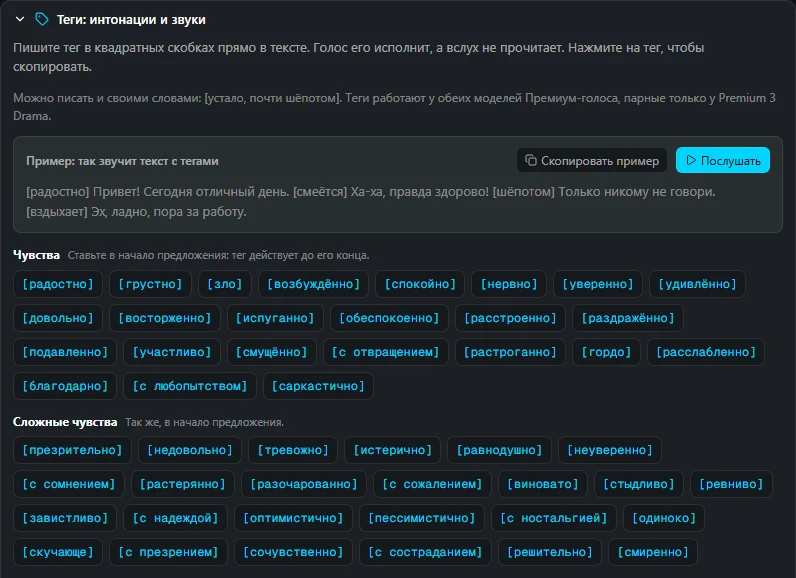
An expressive neural voice can follow instructions embedded in the text. Dictator's guide displays tags in the interface language. In the original Russian example, the voice follows the bracketed instruction rather than reading it aloud. An English rendering of the example is:
[happy] Hello! Today is a wonderful day. [laughing] Ha-ha, this is great! [whispering] Just don't tell anyone. [sighing] Oh well, time to get back to work.
Listen to the original Russian example: the same recording played by Listen in Dictator's tag guide · MP3
Put an emotion at the start of a sentence; it applies through the sentence. Put a sound where you want it to occur, and reinforce it with text such as “Ha-ha” or “Oh.” If a preset is not enough, describe the delivery in your own words, such as “[tired, almost whispering].” The linked audio is the original Russian recording, not newly generated English audio.
Speech-synthesis tools compared
For expressive narration, ask whether you can specify emotion and sounds in the text, and whether the model understands the language of those instructions. Competitor terms are the October 2026 snapshot; Dictator's billing is current to the repository check on 16 November.
Tool
Emotion, sounds and pauses in the text
Free access
Availability from Russia in the review
Best suited to
Dictator Premium Voice
The app's guide includes 73 bracketed emotion, delivery, sound, pause and background tags; Russian tags and free-form instructions supported
Microsoft voices have no character charge but do not follow these tags. A Free account includes 1,000 shared tokens, about three minutes if spent only on Premium Voice
Yes; ruble and USD plan pricing available
Expressive narration, scenes and lessons
Speakmi website and Telegram bot
Russian tags for happiness, whispers and pauses; no full list on the reviewed site
Thirty seconds after registration; then RUB 10–13 per minute
Yes, ruble billing
Short narration from a phone or bot
ElevenLabs
English audio tags such as [laughs], [whispers] and [sighs]; the reviewed documentation did not specify their behavior inside Russian text
Ten thousand credits a month, approximately ten thousand characters, without a commercial license
The reviewed help blocked access from Russia
Expressive English narration
Google Gemini-TTS
English tags in the preview documentation, such as [sigh], [laughing] and [whispering], plus delivery instructions
No free Gemini-TTS allowance in the reviewed pricing
Not specified on the reviewed page; billing required
App developers
Yandex SpeechKit
No bracketed emotion or sound tags in the reviewed workflow; some voices offer a style setting, marina supports whispering; text markup controls pauses and stress
No new-customer grant in the reviewed terms
Yes, through Yandex Cloud
Russian voice bots and applications
SaluteSpeech, Sber
SSML modes including whisper, sad, annoyed and happy for Russian text; no sound-event tags in the reviewed guide
No allowance for new customers in the reviewed terms
The service had stopped connecting new clients from 15 July 2026
Previously connected companies
Microsoft Azure
SSML styles; the reviewed Russian voices Svetlana, Dmitry and Darya did not list styles
Five hundred thousand characters a month in the reviewed tier
Not specified on the reviewed page
App developers
OpenAI gpt-4o-mini-tts, reviewed documentation
Delivery controlled with a separate natural-language instruction rather than the bracketed-tag workflow used here
Not specified in the reviewed page
Russia absent from the supported-country list
Speech generation in applications
A phone's built-in speech synthesis
Voice, rate and pitch rather than these embedded performance tags
Included with the device
Yes
Reading a screen aloud
In the October comparison, Dictator Premium Voice and Speakmi both documented Russian instructions in the text. Dictator also supplied a complete desktop guide explaining tag placement. Try text to speech online or download Dictator to try the app workflow.
Choose a speech-synthesis tool for the task
A Russian video, lesson or scene with happiness, whispers and laughter: Dictator Premium Voice accepts performance tags and free-form instructions in the text.
A book or long text without a character charge: use Dictator's Microsoft voices or suitable offline voices; these are free on every plan. See free text to speech without a character limit.
A Russian voice bot with ruble billing: Yandex SpeechKit is a developer-oriented option in the comparison.
Listening to the text on a phone screen: use Android's built-in text-to-speech system or the iPhone's spoken-content features.
How speech synthesis works
A speech-synthesis system has three broad jobs. First it prepares text: expands numbers, dates and abbreviations, and decides pronunciation and stress. Then it determines delivery, including pauses and the rise or fall of the voice in a question or statement. Finally, the model generates audio.
System voices in Android, iPhone, Windows and macOS are included with the device, but do not use the expressive instruction workflow described here. Cloud neural voices can produce expressive speech, but send text to a server and usually meter usage by characters, credits, tokens or generated audio. Local voices are downloaded once and then read offline; Dictator includes local-voice options in its “On this computer” section.
There are three common ways to control delivery: developer-oriented SSML, where a pause may be written as <break time="1s"/>; bracketed tags like those above; or a separate instruction such as “Read in a whisper, with pauses.” The accepted syntax depends on the model.
Dictator's tag guide: emotion, delivery, sounds, pauses and background
The “Tags: delivery and sounds” guide groups 73 bracketed tags into six categories, adds emotion-strength examples, and describes seven paired tags for Premium 3 Drama. Below are English renderings of the categories in the original guide; the app supplies tags in its interface language.
Emotions, placed at the beginning of a sentence and applying through its end: happy, sad, angry, excited, calm, nervous, confident, surprised, pleased, delighted, frightened, worried, upset, irritated, depressed, caring, embarrassed, disgusted, moved, proud, relaxed, grateful, curious and sarcastic.
Voice delivery, applying until the next tag: hurried, as though running late; shouting at full volume; screaming loudly in panic; whispering; and softly, quietly and gently. Emphasis is placed directly before the word to stress.
Sounds, placed where they should occur: laughing, giggling, sobbing, crying loudly, sighing, groaning, breathing heavily, gasping, yawning, snoring, clearing the throat, taking a deep breath and exhaling.
Background sounds, heard behind the voice: laughter in a room, background laughter and crowd laughter.
Pauses: a pause and a long pause.
Emotion strength: qualify the emotion with “slightly,” “very” or “extremely,” for example “[slightly sad],” “[very happy]” or “[extremely angry].”
Two tags can be placed together, such as “[sad][whispering].” Contradictory combinations, such as happiness and sadness at the same point, are less predictable; describe complex delivery in a single instruction instead. The voice can also follow instructions in other languages. Dictator's interface supports nineteen languages and displays the guide accordingly.
Dictator's tag guide: an example with a Listen button and emotion tags copied by clicking
Generate expressive speech in Dictator in three steps
Download Dictator and sign in to a free account to use cloud Premium Voice. Open Text to Speech and choose Premium Voice as the engine.
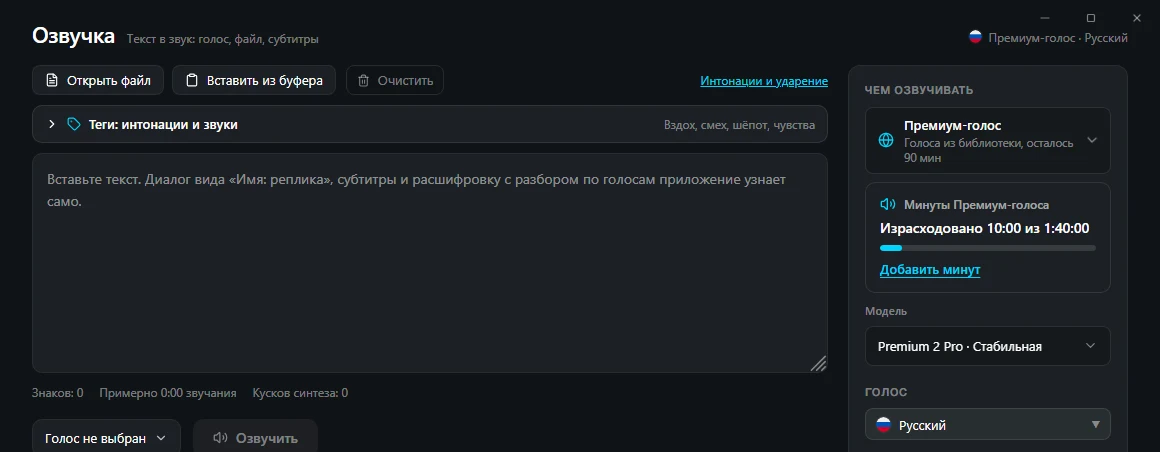
Paste your text and open “Tags: delivery and sounds” above the text box. Click a tag to copy it, then paste it into the text where it should apply.
Choose a voice and generate the audio. You can listen and save the result in MP3, WAV or OGG.
Dictator Text to Speech: tag guide above the text, with Premium Voice, model selection and the account balance on the right
Premium Voice uses the shared account token balance. A Free account includes 1,000 tokens, approximately three minutes when the whole balance is spent on that voice. Basic includes 20,000 monthly tokens for $5.99, Pro 46,000 for $12.99, and Premium 100,000 for $29.99. Those tokens are shared with other cloud features, not separate guaranteed voice-minute buckets. Paid accounts can buy token top-ups, valid for 180 days; new minute packs are no longer sold. Previously purchased minute packs remain usable until their expiry. Both voice models use this billing path. Microsoft and suitable offline voices remain free and do not understand these Premium Voice performance tags. See current pricing.
Premium 2 Pro versus Premium 3 Drama
Premium Voice offers two model choices. Premium 2 Pro is the stable default and supports the emotion and sound instructions described by the guide.
Premium 3 Drama is labeled as a preview in the app. It is designed for more descriptive delivery instructions: emotion, intention, pace and whom you are speaking to, such as “[warmly, as to an old friend] Hello, it's been a long time!” The guide describes its pause instruction as more audible. It also supports paired tags affecting selected words. For example, in “<stress>You</stress> did it. <whisper>Just don't tell anyone.</whisper>,” the selected word is stressed and the second sentence whispered.
The seven paired tag names are whisper, emphasis, stress, soft, forceful, slow and fast. Their names are always written in English, even in another interface language. Drama's output can vary between generations, so listen to important lines before using them.
How other tools control delivery
The ElevenLabs documentation examined for the October review described bracketed tags including [whispers], [laughs], [sighs], [sarcastic] and sounds such as [applause], and using uppercase text for emphasis. Its models supported Russian, but the reviewed documentation did not explain the behavior of English tags inside Russian passages. The checked free plan provided ten thousand credits a month and Starter cost $6 a month. Its help, dated 24 September 2026 in the original review, stated that access from Russia was unavailable. Consult current documentation and plans before relying on those historical terms.
Yandex SpeechKit is aimed at developers. In the reviewed markup, a pause was written as sil<[500]>, with milliseconds inside the brackets, and a plus sign before a vowel marked stress. Emotion was a voice setting rather than this article's bracketed-tag syntax. The voice marina offered whispering, while jane offered cheerful and irritated styles.
What the speech-synthesis setting on a phone means
On a phone, speech synthesis usually means the built-in function that reads text aloud. Android exposes the engine, language, rate and pitch through its accessibility or text-to-speech settings; exact menu names depend on the device. You can choose Google's engine, the manufacturer's engine or another installed app. Download a missing language through the voice-data installation option.
On iPhone, spoken-content accessibility features can read selected text or the screen. In the workflow described by the original review, Speak Selection read a highlighted passage, and Speak Screen read the screen after a two-finger downward swipe from the top. These system settings control voices and reading speed rather than the expressive laughter, whispers and emotion instructions in this article.
Where speech synthesis can make mistakes
The input text itself is often the problem. A model infers stress in words with identical spelling from context; Russian words such as the two pronunciations of “zamok,” meaning a lock or a castle, illustrate the difficulty. Abbreviations may sound odd, while their fully written forms read more naturally. A foreign name in Latin characters may be unpredictable for a Russian voice, whereas an appropriate phonetic Russian spelling can make the intended pronunciation clearer.
Punctuation is the first way to shape delivery: commas and periods suggest pauses, while a question mark changes the end of a phrase. A tag adds a performance that punctuation alone cannot express, but it does not replace a well-punctuated paragraph.
Frequently asked questions about speech synthesis
What is speech synthesis in simple terms?
It is a computer or phone reading written text aloud. The system handles numbers, abbreviations, pronunciation and pauses, then generates audio that you can listen to or save, for example as MP3.
Which speech-synthesis app is useful for expressive Russian narration?
Dictator Premium Voice provides a guide to emotion, sound and pause instructions, including Russian-language tags, and runs through the desktop app with shared-token billing. For a Russian voice bot, Yandex SpeechKit is a developer-oriented option with its own pronunciation and pause markup.
Do emotion tags work in Russian?
Dictator's guide provides Russian instructions for whispering, laughter, sighing and other effects. The model follows them instead of reading the bracketed instructions aloud. The guide covers both Premium Voice models, with paired tags reserved for Premium 3 Drama. The competitor comparison describes the limits of the documentation we checked in October, not proof that other models cannot do it.
Can I use speech synthesis for free?
Yes. Dictator's standard Microsoft and suitable offline voices are free without a character charge. The reviewed catalogue contained 322 Microsoft voices across 75 languages and four local Russian voices. A Free account's 1,000 tokens can also be tried on Premium Voice; they represent about three minutes if the entire balance is spent there. Paid plans and top-ups use the same shared token balance rather than the retired minute packs.
How do I stop a phone from reading everything aloud?
A screen reader such as TalkBack is often responsible and is controlled separately from choosing a text-to-speech engine. The Google help used in the original review explained that a configured accessibility shortcut could toggle TalkBack by holding both volume buttons, or that Google Assistant could respond to a request to turn it off. The available shortcut depends on the phone's settings.
BOZEX develops Dictator (dictator.my), an app for text to speech, voice typing, transcription and translation. The Premium Voice tag guide comes from the app's source. Other services were checked against their documentation and pricing on 14 October 2026; Dictator's billing and model details were checked in its repository on 16 November 2026.
 Dictator
All articles →