Document translators: eight services and six real translation examples
Several services can translate a document into Russian while keeping its tables, columns and slides in place. Far fewer handle scanned pages, presentations and EPUB books. If your file contains scans, tables or slides, Dictator (dictator.my) is an option: it translates complete PDF, Word, Excel, PowerPoint and EPUB files, plus four other formats, returns the same file type, and recognizes and translates text in scanned pages in the same pass. The free plan allows three documents a month, with translation charged to the shared token balance. For a short Word file without images, Yandex Translate may be enough.
We develop Dictator. To test difficult files, we translated 86 real documents in nine formats, from US tax forms to Japanese presentations, and compared every page with the original. The examples and competing services in this review were checked on 10 October 2026. Dictator's plan information below was updated from the current pricing specification on 16 November 2026; the document tests have not been rerun.
See the result before installing: the example gallery puts the original and translation side by side. To translate your own file, download Dictator.
Which document translator should you choose?
The competing services in this table describe the October 2026 review, including the availability checks from Russia. Their current terms may differ.
Service
Formats and size
Free allowance
Scans in PDFs
Availability from Russia in the review
Best suited to
Dictator app
PDF, DOCX, XLSX, PPTX, EPUB, TXT, MD, CSV, HTML; files up to 25 MB, PDFs up to 500 pages
Three documents a month; translation and OCR use the shared token balance; free sign-in required. Paid plans remove the document-count limit
Yes, subject to the shared token balance
Yes, with ruble billing; USD plans also available
Scans, presentations, spreadsheets and EPUB books
Yandex Translate
PDF, DOC, DOCX, XLS, XLSX, PPT, PPTX; upload page listed up to 15 MB
No sign-in; no file-count limit listed on the site
No: its help said scanned documents could not be translated
Yes
Ordinary Word files and PDFs without images
Google Translate
PDF, DOCX, XLSX, PPTX; up to 10 MB, PDFs up to 300 pages
No sign-in; desktop only
No: text in scanned pages remains untranslated
Yes
Long PDFs containing selectable text
DeepL
Free: PDF, DOCX, PPTX; Excel from the Team plan
One file a month up to 5 MB after registration; free translated files could not be edited; Pro from €7.49 a month
Yes
The site displayed “Unavailable in your region”
Working abroad with an accepted payment card
Timbrica
PDF, DOCX, XLSX, PPTX, EPUB; up to 100 MB
One file a day without sign-in; Premium RUB 449 for three months
Yes
Yes, including Mir card payment
One file a day
Belin Doc
PDF, DOCX, XLSX, PPTX, TXT, EPUB; up to 100 MB
Twenty pages, including five scanned pages, without registration; 800-page pack for $4.90
Yes
Site accessible; Russian card payment not explained
A one-off large PDF
DocTranslator
PDF, Word, Excel, PowerPoint, TXT; up to 10 MB
No registration; no file-count limit listed
No: it first directed users to convert the scan to Word
Yes
Free translation without sign-in
ChatGPT, as tested in the review
Could read PDF, DOCX, XLSX and PPTX, but the reviewed workflow returned translation as chat text rather than a laid-out file
Three files a day after registration
Not in the reviewed free workflow
No
Understanding a short document
Many free services preserve some formatting. The distinction in our review was scanned PDFs: among the services available from Russia, Dictator, Timbrica and Belin Doc handled them. Of the services in this table, Dictator accepted EPUB, CSV, Markdown and HTML together. Download Dictator, or first compare the translation examples.
Match the translator to the document
The best choice depends on what is inside the file.
A scanned document or image-only PDF: Dictator recognizes the text on the page and overlays the translation without first converting the file to Word. In the October review, Belin Doc offered five scanned pages free as an alternative.
A PowerPoint presentation: Dictator translates slide text, layout text and speaker notes while keeping the slide order and images.
An Excel workbook with formulas: Dictator leaves formulas, links between sheets and number formats alone; it translates text in cells.
An EPUB book, CSV export, Markdown file or HTML page: Dictator accepts all nine formats on every plan. Timbrica and Belin Doc also accepted EPUB in the review.
A short Word file or text PDF, immediately and without sign-in: Yandex Translate.
A 200–300-page PDF containing selectable text, for free: Google Translate, under the reviewed limits.
A document for notarization or submission to an authority: use a qualified translation service and check the receiving authority's requirements. Machine translation is useful for understanding a document; it does not by itself provide certification.
What happens to a difficult document: six examples
A useful test gives a translator something that could break: form fields, diagrams made of shapes, an image-only scan, hundreds of table values, or a slide assembled from dozens of blocks. The six examples below come from our October test. Each image shows the source and Dictator's translation. Four complete documents are available in the gallery; the spreadsheet is on the document-translation page.
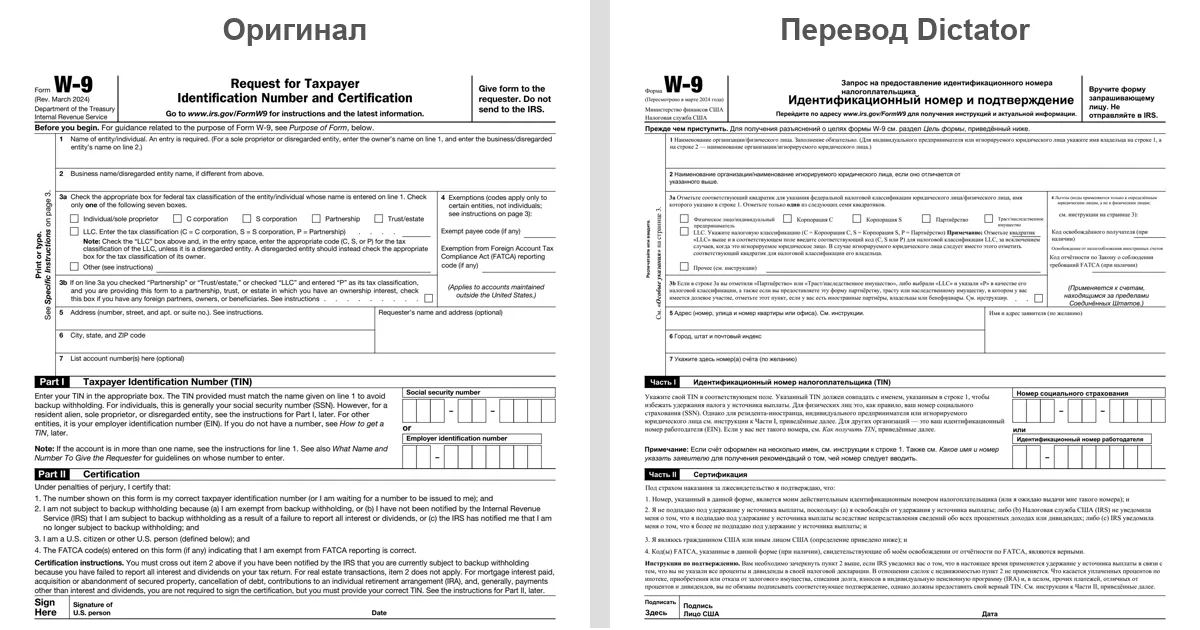
IRS Form W-9: fields and checkboxes
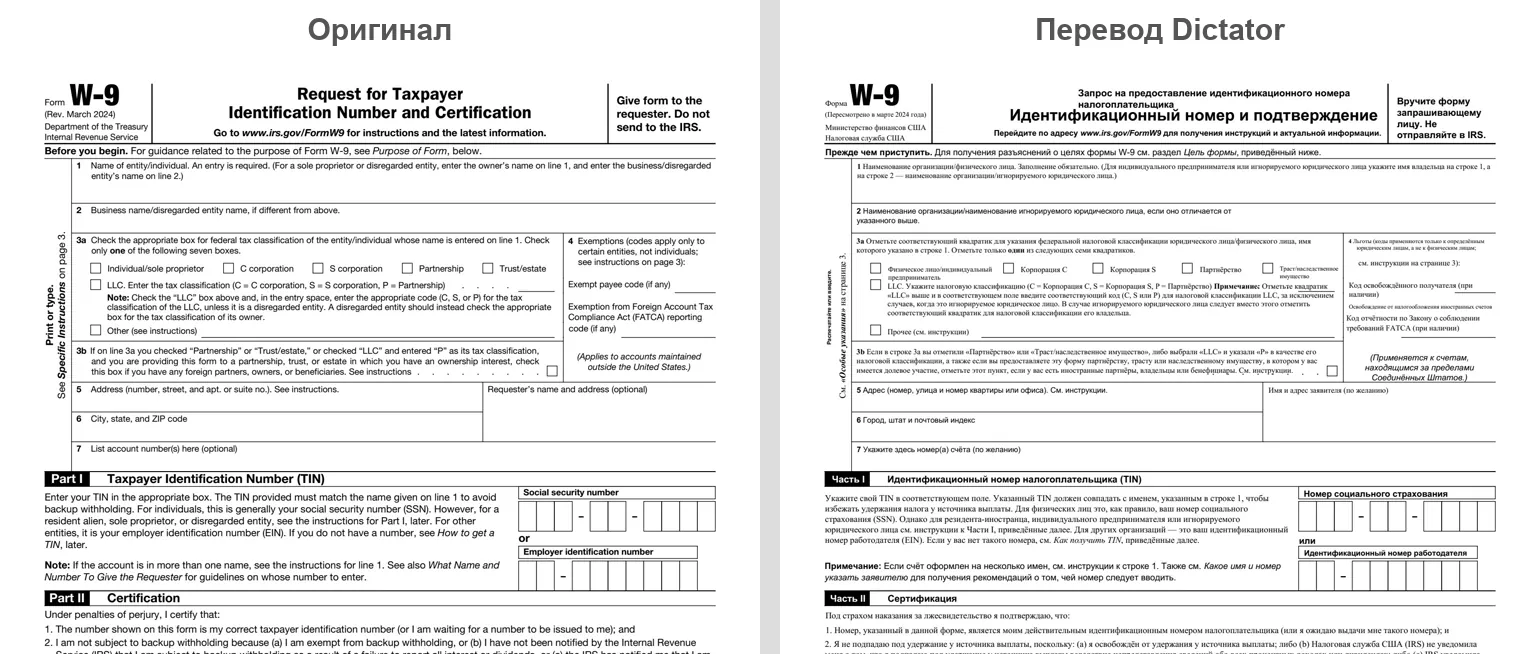
The US tax form is dense: numbered fields, checkboxes, small print in two columns, and a rotated note in the margin. After translation, each field stayed on its own line, the checkboxes remained checkboxes, and the translated “See Specific Instructions on page 3” appeared where the original note had been. See the complete form.
IRS Form W-9: English source on the left, Dictator's Russian translation on the right; fields, checkboxes and columns remain in place
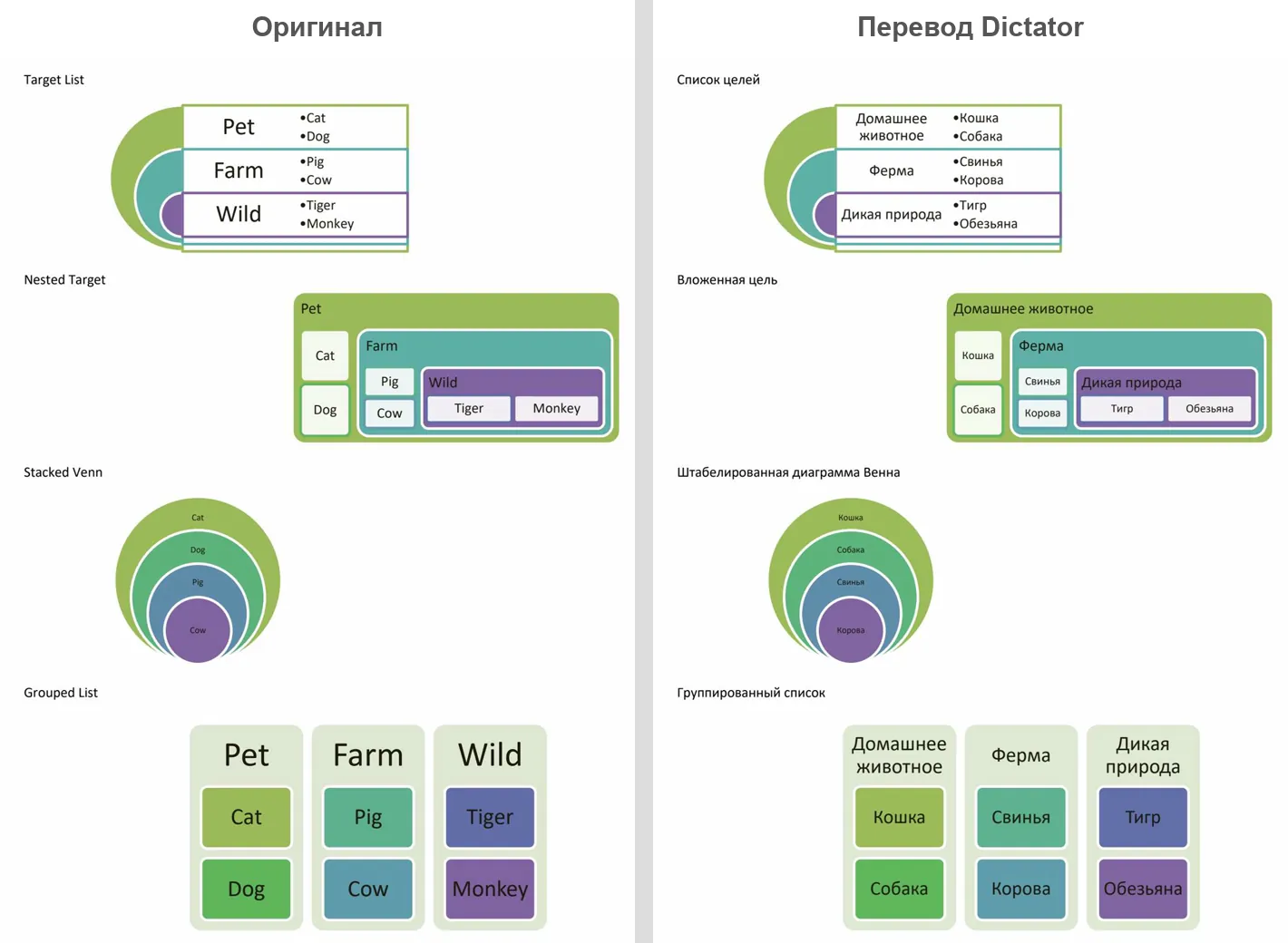
SmartArt diagrams in Word
This Word file contains four SmartArt diagrams: nested frames, concentric circles and a grouped list. Each label belongs to its own shape, and the Russian translation is longer than the English: the short “Pet” becomes a much longer Russian phrase. Dictator translated the labels inside their shapes. Longer labels used smaller text or wrapped onto a second line, but none extended beyond its block. Colors, nesting and shape order matched the original. See the document.
SmartArt in Word: English on the left, Russian translation on the right; labels remain inside their shapes
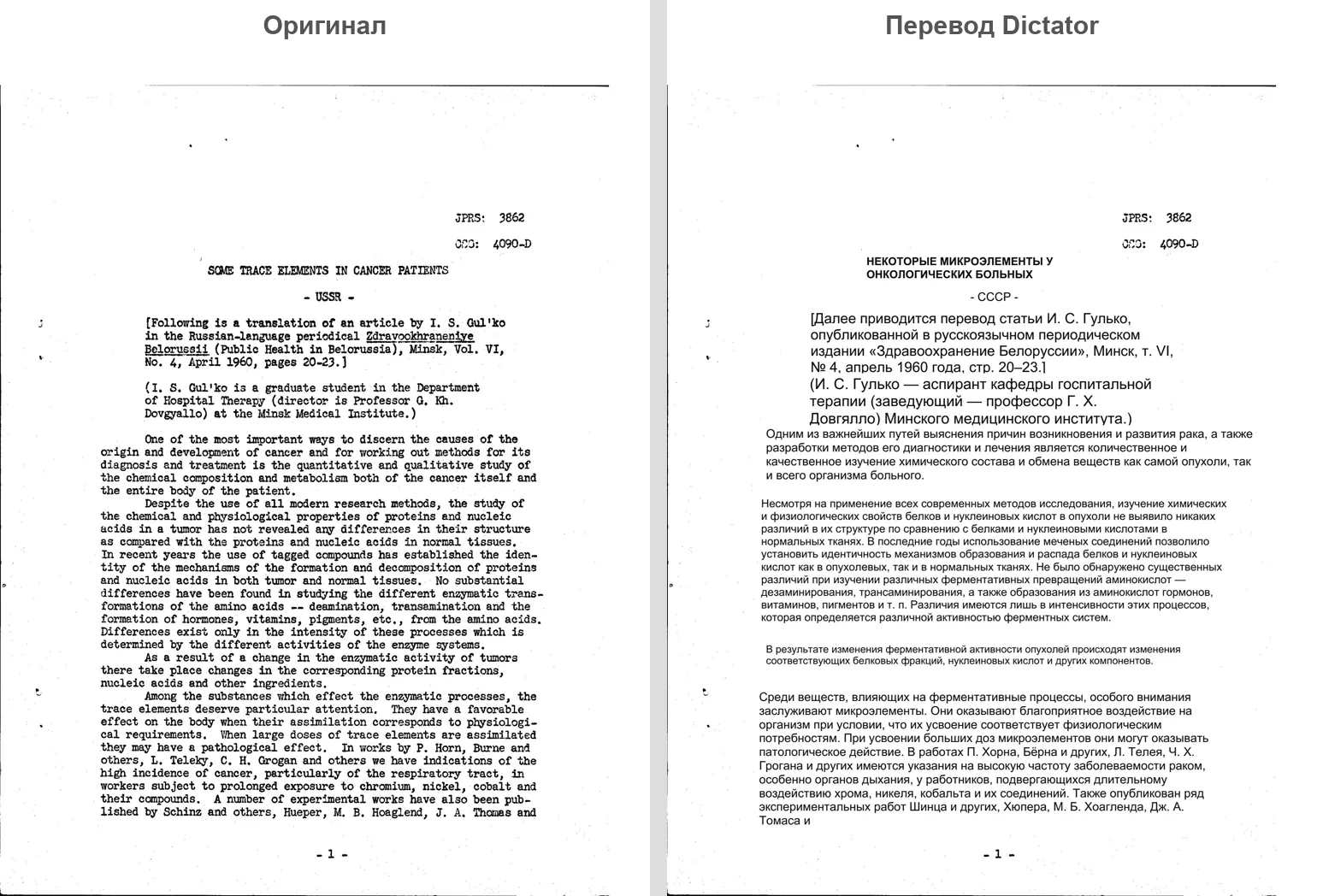
A typewritten report from 1960
This report has no text layer: every page is a photograph of typewritten paper. The Yandex and Google workflows in our review did not translate such pages. Dictator recognized the text and overlaid a Russian translation on the scan. There was an amusing coincidence: the scan's heading identified it as an English translation of an article by I. S. Gulko in the Minsk journal Zdravookhranenie Belorussii, April 1960. The app had effectively returned the article to Russian.
A scanned typewritten report from 1960: English typewriting on the left, Russian text overlaid on the scan on the right
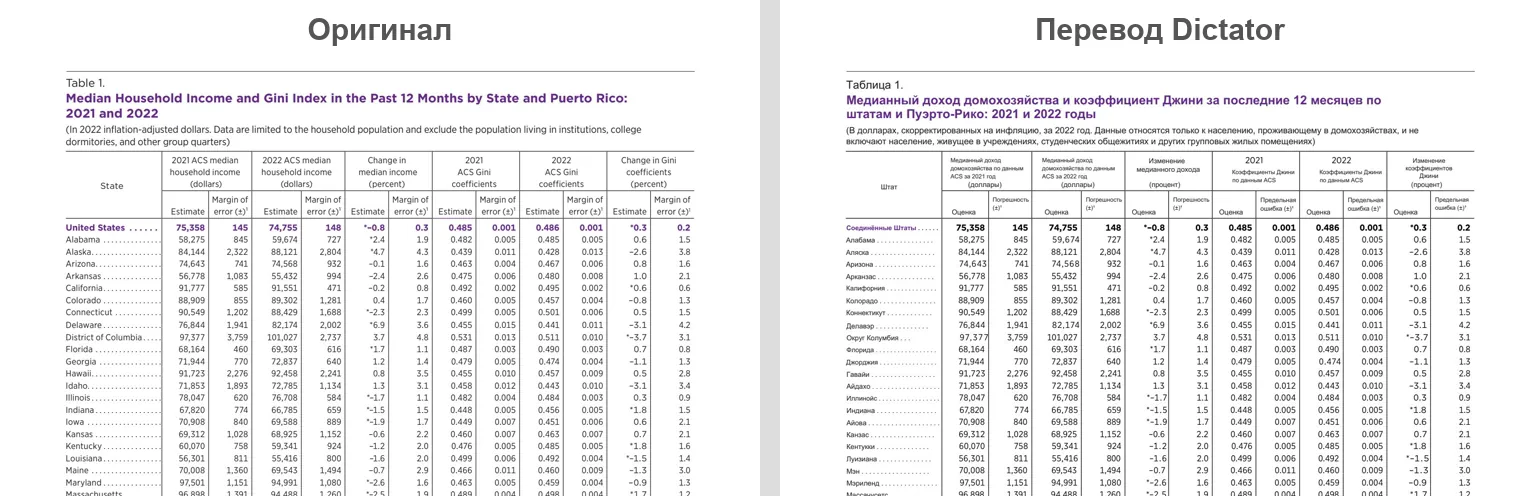
A US Census table with more than 50 rows of figures
One page of the US Census Bureau report contains 53 rows and 12 columns of figures: income, margins of error and Gini coefficients by state over two years. Translation often causes one of two problems in a table: numbers move into the wrong columns, or their representation changes. Here, each figure remained beside its state, the state names appeared in Russian, and the table's footnotes were translated. See the full report.
US state income table: English source on the left, Russian translation on the right; numbers stay in their columns
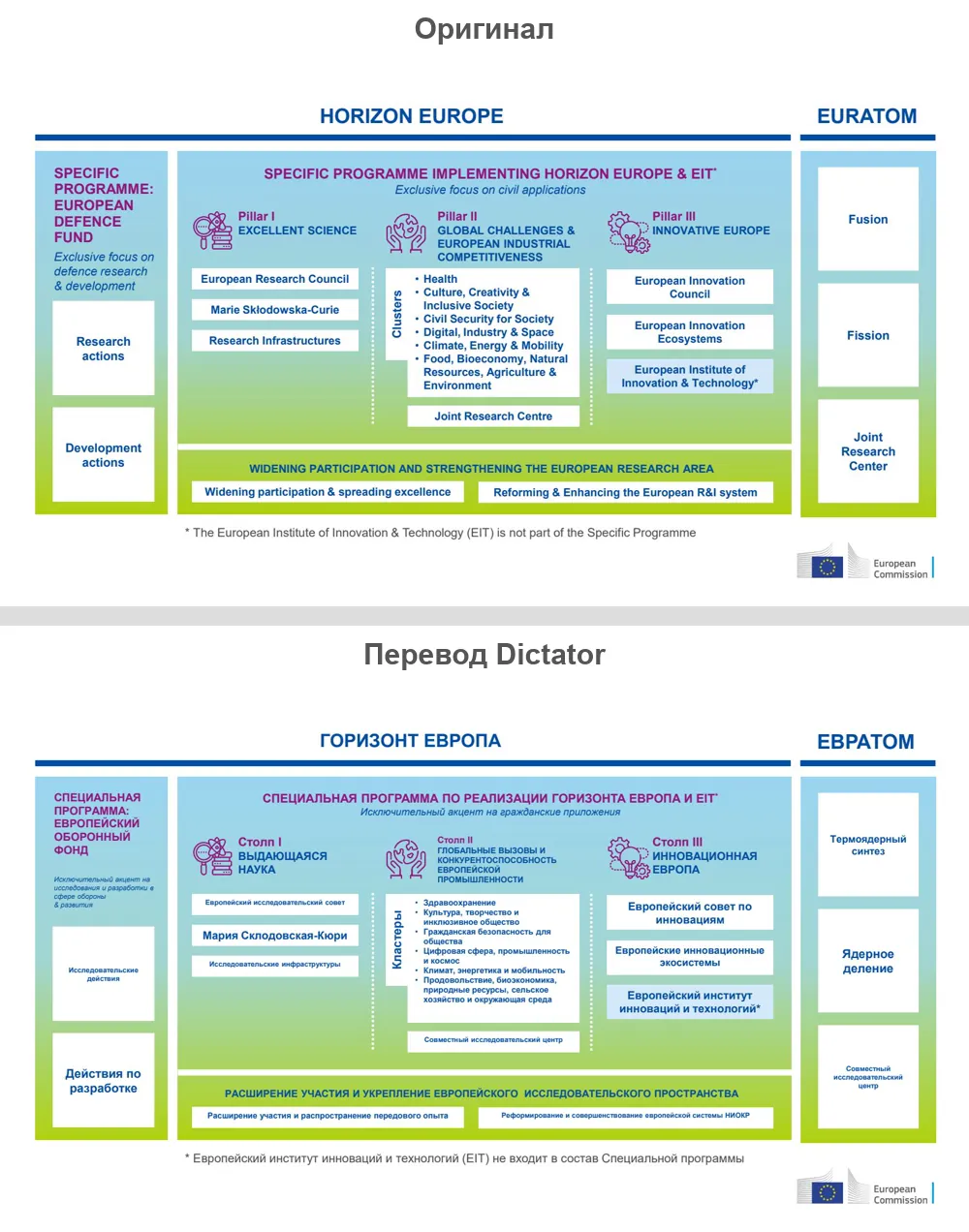
A PowerPoint diagram slide
The European Commission's Horizon Europe slide is assembled from more than two dozen blocks: three pillars, a cluster list with a vertical heading, side blocks and a footnote. Dictator translated each label inside its frame, and the vertical “Clusters” heading stayed vertical. Where a Russian phrase needed more room, such as “Joint Research Centre,” the font became smaller; no label extended beyond its block. See the complete presentation.
Horizon Europe slide: English source above, Dictator's Russian translation below; all blocks remain within their frames
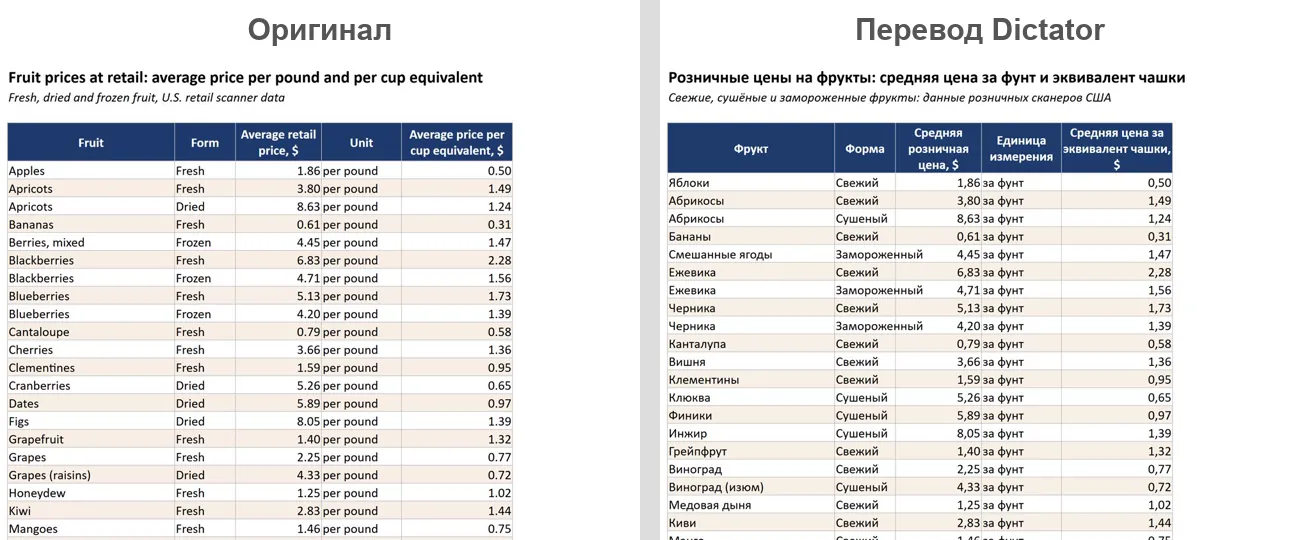
An Excel price list
The US Department of Agriculture's price table for 39 fruits was translated in the same .xlsx file: headings, fruit names and units. Prices remained numbers, so the workbook could still calculate and sort. Download the original and translation and open them in Excel from the document-translation page.
Excel fruit-price table translated into Russian: names and headings are translated, while prices remain numeric
Dictator: complete documents, including scans and slides
Dictator (dictator.my) translates documents, transcribes recordings and types from speech. Its document translator changes the text inside the file rather than rebuilding the document from copied text, preserving styles, tables, headers, footers and page structure.
Formats: PDF, DOCX, XLSX, PPTX, EPUB, TXT, MD, CSV and HTML on every plan. Files can be up to 25 MB, and PDFs up to 500 pages.
Scans and images inside PDFs: their text is recognized and translated in the same pass. This work uses the account's shared tokens rather than a separate promise of free scanned pages.
Languages: translation in either direction across 198 languages, not only into Russian.
Free plan: three document translations a month. Translation and OCR consume the shared token balance; the Free account includes 1,000 tokens. The amount of text a balance can cover depends on the document and processing work.
Paid plans: Basic $5.99 a month with 20,000 monthly tokens; Pro $12.99 with 46,000; Premium $29.99 with 100,000. Paid plans have no separate document-count cap, but processing still consumes tokens. Ruble prices are RUB 390, RUB 890 and RUB 1,990 respectively. See current pricing for billing options.
After translation: choose where to save the file. Translation history lets you open the original, translation or a line-by-line comparison.
Best suited to: scans, presentations, spreadsheets and books that a basic text-only workflow cannot handle.
Document translation runs on our server, as it does with online document services. Local speech recognition and offline text translation in the app run on your own computer without sending that work to the internet. Download Dictator for free.
Where the other services help, and where they stop
These details describe our checks on 10 October 2026.
Yandex Translate. It accepted the older .doc, .xls and .ppt formats and saved translations “in the original document format.” Yandex gave different upload limits: up to 15 MB on the upload page, up to 5 MB in its help. For a scan, the help recommended saving a JPG or PNG and using the Images tab.
Google Translate. The document tab worked on computers, not phones. Google's help stated that text in images inside a PDF would remain untranslated.
DeepL. AI assistants frequently recommended it for quality: in our original query exercise, Alice and Perplexity named DeepL in seven of eight answers. That is a record of those answers, not an independent quality ranking. A free translated file could not be edited; Pro started at €7.49 a month for three files, and Russia was absent from the supported subscription countries.
Timbrica and Belin Doc. Both worked in the browser and recognized scans. Timbrica Premium, RUB 449 for three months, increased the daily limit from one to 1,000 files. After its free 20 pages, Belin Doc sold page packs in dollars.
DocTranslator. It used Google's translation engine and displayed advertising. For a scan, it first suggested converting the document to Word on another website.
ChatGPT. The chat workflow in the October review was useful for understanding a document: it could summarize a file or translate its text into the conversation. It was not the workflow we used for returning the same document with its original layout.
Why formatting breaks during translation
Three common causes can affect any service.
Russian text is longer than English. Where there is space, a paragraph simply grows taller. A narrow table cell, slide button or SmartArt shape offers less room. Some translators reduce the font; others allow text to overflow.
A scan has no selectable text. To software, the page is an image. Without OCR, a translator may return it unchanged, leaving you with a supposedly translated document still in English.
The text was copied out of the file. Pasting into a chat or text box is quick, but the result is plain text: tables, columns, numbering, headers and footers can disappear. You then have to rebuild the document.
Translate the file itself rather than only the text copied from it. If you have the original Word or PowerPoint file, use it instead of a PDF exported from it: the source file tells the translator more clearly which parts are paragraphs, tables and shapes.
Translate a PDF into Russian in three steps with Dictator
Download Dictator, open the account menu and sign in. Use a sign-in option available for your region or your email address. Creating an account is free.
Open Document Translation, choose Russian in “Translate to,” and select “Open document.” You can also use “From clipboard” or Ctrl+V to paste a file.
Choose where to save the translation and wait for the saved-document confirmation. The file also appears in translation history, where you can compare it with the original.
Frequently asked questions
How do I translate a PDF into Russian and preserve formatting?
Upload the PDF itself to a translator that returns a file, such as Dictator or a suitable document-translation service. Copying text into a text box loses tables and columns. If the PDF contains scans, choose a workflow with OCR; in our October review, Dictator, Timbrica and Belin Doc handled them, while the reviewed Yandex and Google workflows did not.
How do I translate a scanned document into Russian?
Use a translator with OCR. Dictator recognizes text inside scanned PDF pages and overlays the Russian translation; the processing uses your shared token balance. Without OCR, a scan remains an image in its original language.
Can I translate a document for free?
Yes. In the October review, Yandex Translate worked without sign-in or a listed file-count cap, and Google translated text PDFs up to 300 pages. Dictator's Free account permits three documents a month, with translation and OCR charged to its shared token balance, including scans, presentations and EPUB files.
How can I translate PowerPoint slides without moving their contents?
Translate the .pptx file itself. Dictator changes slide text, layout labels and speaker notes while leaving block positions and images in place. Russian is longer than English, so narrow shapes may use smaller text. Review a text-heavy slide before presenting it.
Which files does Dictator translate?
PDF, DOCX, XLSX, PPTX, EPUB, TXT, MD, CSV and HTML, up to 25 MB; PDFs up to 500 pages; 198 target languages. Save older .doc, .xls and .ppt files in the newer formats using Word, Excel or PowerPoint first.
Does the document leave my computer?
Yes. Dictator's document translation runs on a server, as do online document services. Remove unnecessary personal information before uploading a sensitive contract to any service. Local speech transcription and offline text translation in Dictator run on the computer without the internet.
Competing services were checked on their websites on 10 October 2026. The example page pairs come from the test on that date. Dictator's shared-token billing and document allowances were checked against its pricing specification on 16 November 2026. Related workflows: photo and screen translation, conversation translation, and audio transcription.
Who wrote this
BOZEX develops Dictator (dictator.my), an app for document translation with preserved layout, transcription and voice typing. The original review used 86 real documents in nine formats and compared each page with its source. Other services were checked on 10 October 2026; Dictator's billing information was updated from its pricing specification on 16 November 2026.
 Dictator
All articles →