Transcribe calls without a bot joining the meeting
There are three ways to transcribe a call without adding a bot participant: capture its audio with an app on your computer, use the meeting platform’s built-in transcription, or upload an existing recording to a service. For regular client and team calls, Dictator (dictator.my) records computer audio together with your microphone and recognizes speech locally, without a transcription bot or a monthly local minute allowance. Once the recognition model is downloaded, that work does not require the internet or spend cloud tokens. On Windows, Dictator can start when a call begins in the Zoom, Teams or Telemost app. No additional participant appears in the meeting.
We develop Dictator. Its local/cloud distinction and token allowances below were checked against the product specification on November 16, 2026. The other options came from Alice and Perplexity’s responses to our questions about bot-free transcription on October 14, 2026. Their prices, free allowances and platform restrictions below remain that dated October 14 snapshot; RUB prices refer to the original Russian-market comparison.
Download and install Dictator from dictator.my. An account is not required for local recording and recognition.
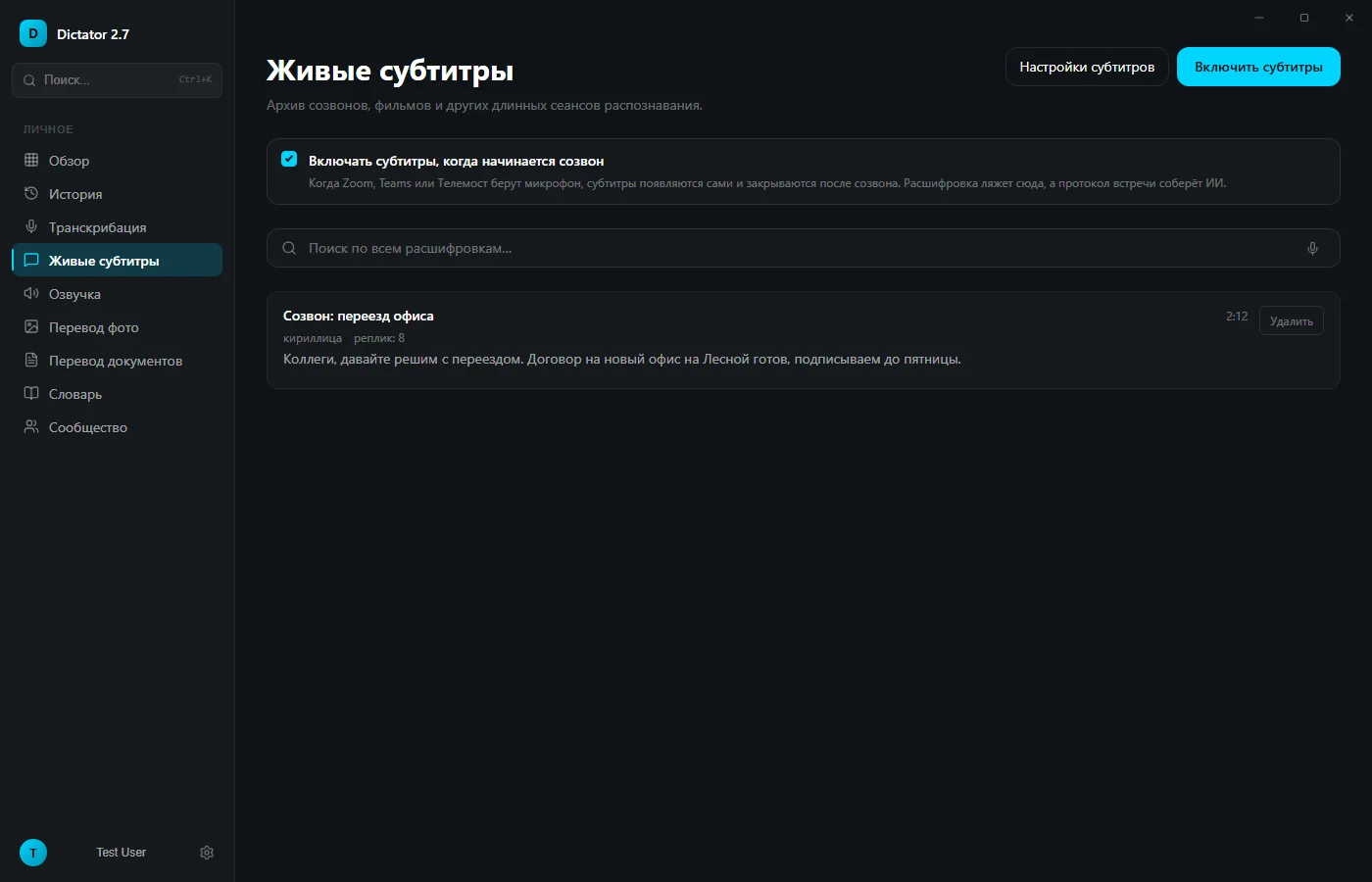
Open Live captions. On Windows, enable “Turn on captions when a call starts.” When the Zoom, Teams or Telemost app uses the microphone, captions can appear automatically and close after the call. For a browser call or on Mac, press “Enable captions” before the meeting. Capturing other apps’ audio on Mac requires macOS 13 or later and the relevant screen-recording permission.
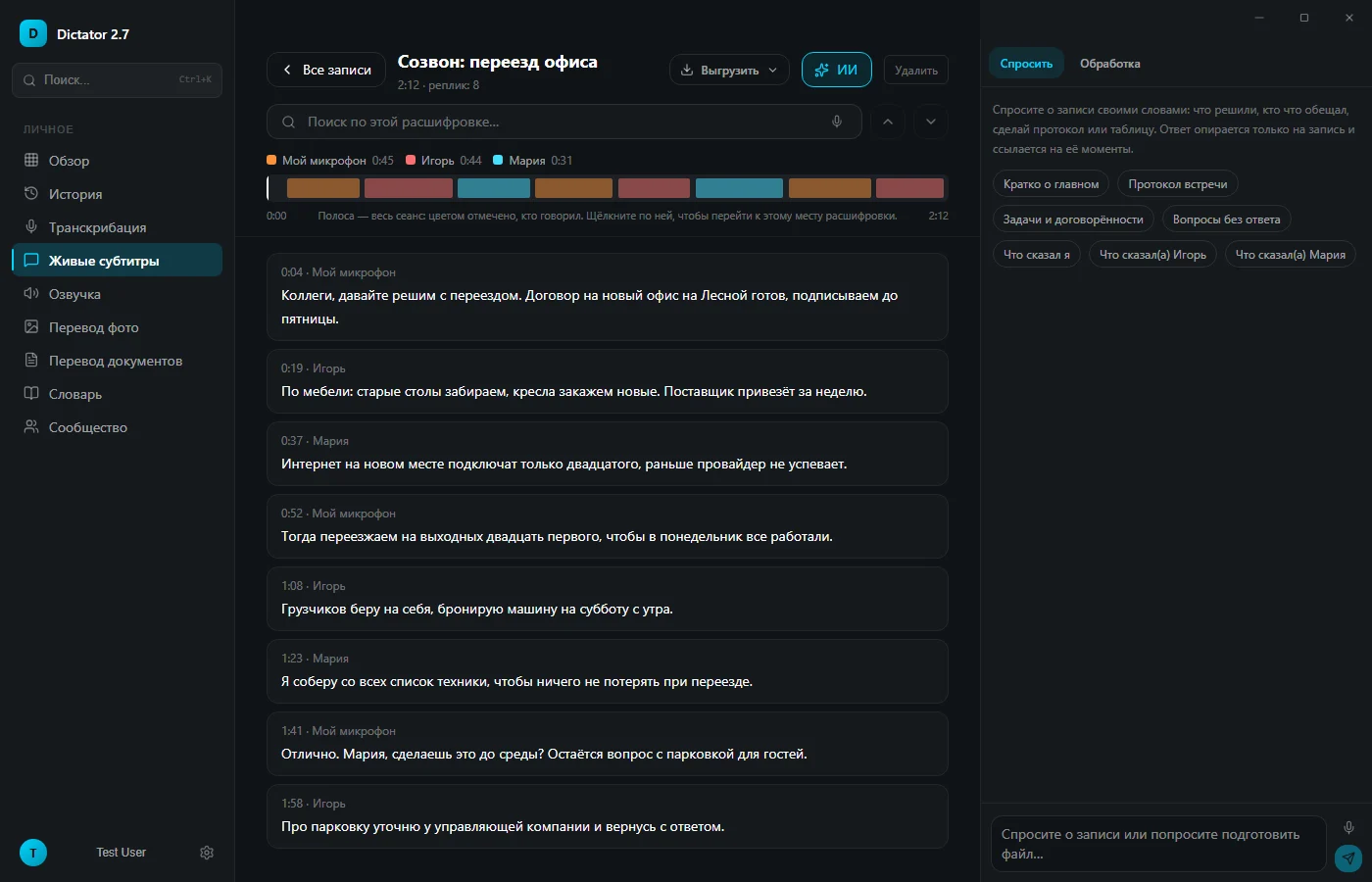
Make the call as usual. Dictator receives the other participants through computer audio and your voice through the microphone. Your turns are labeled “My microphone”; the other participants can be separated by voice and renamed.
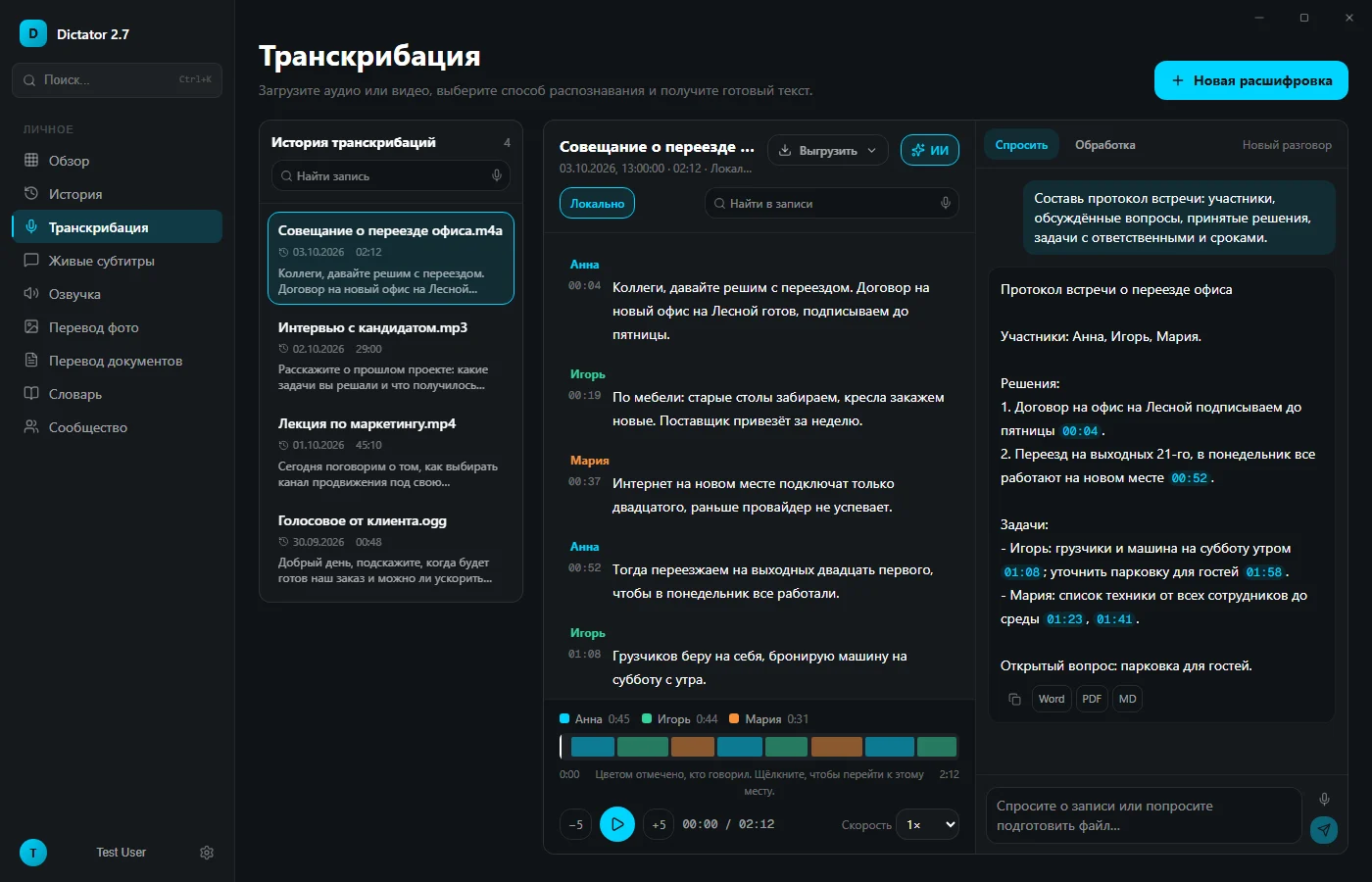
Afterward, open the recording in the Live captions archive. AI can create meeting minutes, tasks and agreements, or answer a question with links to moments in the conversation. AI processing requires internet access, an account and available shared cloud tokens; local recording and recognition are separate.
Dictator’s Live captions page with automatic call-start captions and a meeting archive
Recording and transcription options compared
Option
Bot in the meeting
Free offer
Where recognition runs
Paid offer in the checked comparison
Best suited to
Dictator
No; captures computer audio
Unlimited local recognition, with no token charge
Your computer, offline after the model downloads
Local recognition needs no subscription; cloud functions use shared tokens
Daily calls and recordings that must stay out of the cloud
mymeet.ai
Bot or a bot-free app
180 minutes monthly; free meetings became inaccessible after 30 days
Servers in Russia
Lite RUB 850 monthly for 500 minutes
A bot that attends when you are absent
Memo AI
No; desktop app
50 minutes monthly across meetings and files
Memo AI’s servers in Russia; internet required
Lite RUB 689 monthly for 500 minutes
Meetings and uploaded files in one cloud workspace
QuillHub
No; desktop app
60 minutes on registration; app trial for 14 days
Cloud; recognition contractors in the US and France
Unlimited RUB 990 monthly, or 150 minutes for RUB 250
Minute packs without a subscription
Speechka
Bot; browser extension for Google Meet
180 minutes every 30 days
Its server in Russia
Lite RUB 299 monthly excluding VAT for 500 minutes
Low-cost minutes and a bot that announces recording in chat
Telemost meeting notes
No; built-in platform feature
No; organizational offer
Yandex cloud, taking up to 24 hours
Yandex 360 for Business from RUB 319 monthly per employee
Client calls every day, where a bot would be unwelcome: Dictator captures audio locally and does not meter local recognition minutes.
The conversation must not go to another company’s server: Dictator with local recognition selected; cloud AI features remain an optional, separate operation.
Telegram or WhatsApp calls on Windows: Dictator can detect these too when the conversation lasts more than 25 seconds.
You need a recording of a meeting you cannot attend: mymeet.ai or Speechka can send a bot through the meeting link.
Your company already uses Yandex 360 for Business: Telemost’s notes may fit if its processing time and access rules are acceptable.
You already have a recording file: import it in Dictator’s Transcription section and select local recognition.
Dictator: your computer transcribes the call
Dictator transcribes calls and recordings, types from speech and reads text aloud. For meeting capture it needs neither a bot nor a meeting link: it hears computer audio and your microphone. Your own computer recognizes the speech, so local captions and recognition are not limited by a monthly cloud-minute allowance, including on Free.
Free locally: recording, recognition and local speaker separation without a minute allowance or token charge. Local recognition does not require registration.
Where it works: apps and browser meetings, because it captures computer audio. On Windows it detects calls in Zoom, Teams, Telemost, Skype and Webex, as well as Telegram and WhatsApp. Start captions manually for browser meetings and on Mac.
Offline recognition: the model downloads once; subsequent local recognition can work without an internet connection. Cloud AI meeting minutes require internet access and available tokens.
Output: speaker-labeled turns and timestamps, archive search and playback from a chosen moment.
Exports: export is included on every plan. Windows supports Word, PDF, SRT, VTT, TXT, Markdown, CSV and JSON, with optional speaker names and timestamps; available formats depend on platform.
Foreign-language calls: captions can be translated during the conversation. Offline translation does not spend cloud tokens; online AI translation uses the shared account balance.
Cloud budget: Free includes 1,000 monthly tokens for enabled cloud features; Basic includes 20,000 for $5.99 monthly, Pro 46,000 for $12.99, and Premium 100,000 for $29.99. Local recognition does not consume that balance. Free includes limited cloud speech recognition within its shared 1,000-token balance. Current pricing.
Best suited to: sales calls, negotiations and team meetings where you need a transcript of each conversation.
A Dictator call transcript with “My microphone” and named speakers, timestamps, and actions for meeting minutes and tasks
A transcription bot joins through the meeting link as a separate participant. In the checked mymeet.ai workflow it appeared in Telemost under the service’s name and logo; Speechka used a name indicating that recording was in progress. This can be convenient at an internal meeting, but a client sees the extra participant too. Local capture avoids three practical restrictions.
The bot has to be admitted. In someone else’s meeting, the organizer decides whether to let it in; it may remain in a waiting room. The checked mymeet.ai Telemost bot supported public meetings by default rather than corporate Telemost meetings.
A personal call has no meeting link. A Telegram or WhatsApp call is not a link-based meeting for a bot to join. Dictator on Windows detects such conversations after more than 25 seconds, helping distinguish them from brief voice-message activity.
The recording goes to the cloud. Bots process meeting audio on the provider’s servers and count minutes. Bot-free apps from Memo AI, QuillHub and mymeet.ai also used cloud recognition in the checked workflows. Dictator’s local recognition keeps the recording on your computer; choosing a cloud AI operation sends the required data for that operation.
What if you already have a recording?
Import the finished file into a transcription app. In Dictator, drag it into Transcription and select local recognition. Local recognition is unlimited and does not use tokens, including on Free; speaker separation is also free. AI can create meeting minutes with links back to the recording, using available cloud tokens.
In the developer’s October 3, 2026 measurement, Dictator transcribed 98.8% of words in ordinary Russian speech correctly, with telephone-quality audio having little effect. Names, amounts and dates in a separate business-meeting sample were transcribed without an error, with amounts and dates rendered as figures.
Dictator meeting minutes with decisions, tasks, responsible people and links to moments in the recording
You can also create a recording using the meeting platform. In the Telemost workflow checked for the original article, a participant could record locally unless the organizer prohibited it. Zoom’s built-in transcription applied to cloud recordings on eligible paid plans, not local recording files. A file shorter than five minutes can be transcribed online on this site without registration.
Built-in transcription in Zoom, Teams and Telemost
Built-in transcription does not add a bot, but the platform informs participants. Zoom shows recording notifications; Teams announces transcription; Telemost indicates that meeting notes are being prepared.
Zoom: the checked workflow produced a separate VTT transcript after cloud-recording processing. It did not automatically transcribe recordings saved only to your computer.
Teams: people from the organization hosting the meeting could start transcription when enabled by its administrator. Participants from another organization could not start it in the described workflow.
Telemost: full AI meeting notes were available to organizations using Yandex 360 for Business. Processing could take up to 24 hours, with results sent to the organizer rather than external-company guests.
In someone else’s meetings, built-in transcription may be unavailable to you. A local audio-capture app can work in meetings you join, while notification and consent remain your responsibility.
Should you tell other participants you are recording?
Tell participants at the start and obtain any agreement required for the meeting and the applicable jurisdiction. A bot is visible in the participant list; local recording generally is not, so the app cannot replace that conversation. A practical opening is: “I’d like to record this call to prepare meeting notes. Is that okay?”
The original Russian article referenced Article 152.2 of the Russian Civil Code, which protects private-life information; a business conversation can contain such information too. That reference concerns Russian law and is not a universal rule for every country. Russian Civil Code text, published by a government body.
Frequently asked questions
Can I transcribe calls for free without a minute allowance?
Yes, when recognition runs locally. Dictator’s local captions, recognition and speaker separation are free and do not spend cloud tokens. The compared cloud meeting services offered between 50 and 180 free minutes monthly, or a one-time 60-minute trial.
Will other participants see that I am recording?
A local app does not appear as an extra meeting participant. A bot does, and built-in recording or transcription in Zoom, Teams and Telemost shows a notification. Tell participants yourself when using local capture and follow the meeting’s applicable requirements.
How do I transcribe a Zoom call without a bot?
Enable Dictator before the call. On Windows, automatic captions can start when the Zoom app uses the microphone; on Mac, start captions with the button. Zoom’s own transcription in the checked workflow required an eligible paid plan and cloud recording.
Can I transcribe a Telegram call?
Yes. On Windows, Dictator can detect Telegram and WhatsApp calls lasting more than 25 seconds and retain them in the archive. On Mac, enable captions manually before the call. If you already have a file, import it into Transcription. Telegram voice messages are covered in a separate guide in Russian.
Does call transcription work offline?
Local recognition does, once the model is downloaded. The call itself may of course require an internet connection. Cloud AI meeting minutes and questions about a recording require internet access and available shared tokens.
Can I transcribe a telephone call?
If your calls use a hosted telephone system, its own transcription can be convenient because the recordings already reside there. Transfer a mobile-phone recording to Dictator as a file. Supported inputs include MP3, M4A, WAV, OGG, OPUS, MP4 and MOV.
Do I need anything besides the Windows app?
No virtual audio driver is required: Dictator captures other participants through Windows’ audio facilities. On Mac, capturing system audio requires macOS 13 or later and the relevant screen-recording permission.
Competing services’ prices, allowances and workflows were checked on October 14, 2026, for the original Russian article. Dictator’s local recognition and shared cloud tokens were checked against the product specification on November 16, 2026. The cited accuracy measurement remains the October 3 test; no new benchmark is claimed. Further reading: audio-to-text software and free transcription.
Who wrote this
BOZEX develops Dictator (dictator.my), an app for local meeting transcription, voice typing and text to speech. Competing services were checked on their websites on October 14, 2026. Dictator’s local recognition and shared cloud tokens were checked against the product specification on November 16, 2026.
 Dictator
All articles →