You can convert audio to text with an online service or an app on your computer. An online service is convenient for a short file, but it counts minutes and uploads the recording to its server. If a recording is confidential or you have many files, Dictator (dictator.my) is an option: it transcribes on your computer, without an internet connection or a monthly minute allowance, and transcribed 98–99% of ordinary speech correctly in our test.
We develop Dictator. Its current local/cloud distinction and token allowances come from the product specification checked on November 16, 2026, its accuracy comes from our original measurement, and the other providers’ terms come from their own websites. The selection includes Dictator and six services that Alice, ChatGPT and Perplexity named when asked how to transcribe a recording in our five-question survey on October 3, 2026. Competing services’ free allowances and prices below are the October 3, 2026 snapshot used in the original article, rather than newly checked November prices. RUB amounts describe the Russian-market offers compared at that time. Dictator’s local recognition and cloud allowance information has been updated.
How to choose an app: five questions
Choose software around your recordings. These five questions usually narrow the choice to one or two options.
Can the recording go to the cloud? A meeting about contract amounts, a medical appointment or a conversation with a lawyer may be better processed where the recording stays on your computer.
How many recordings do you have each month? One weekly file may fit a service’s free allowance. An hour every day calls for a subscription or an app that does not count minutes.
Do you need speaker names and timestamps? Interviews and meeting transcripts are much harder to use without them.
What language is the recording in, and do you need a translation? Every option in this list supports Russian speech; not every one translates the resulting transcript.
Do you want an app or a browser service? A browser is quicker for a one-off file. An installed app is convenient for regular work.
Which apps convert audio to text for free?
App
Free transcription
Speaker separation
Transcript translation
Offline
Paid offer in the original comparison
Dictator
Unlimited local recognition; no cloud tokens used
Free local separation
Unlimited offline translation into 45 languages; online AI translation into 198 languages uses shared tokens
Yes, free locally
Optional cloud plans from $5.99 monthly; local recognition needs no subscription
Speech2Text
180 minutes on registration, then 15 minutes a day
Within the free minutes
Not specified on the website
No
From RUB 500 a month for 6 hours
mymeet.ai
180 minutes a month
Within the 180 free minutes
Not specified on the website
No
From RUB 1,100 a month for 500 minutes
Any2Text
15 minutes without registration and another 60 after registration, once
Within the 75 free minutes
Paid only, from RUB 460 a month
No
RUB 3.50 a minute or RUB 460 a month
TurboScribe
3 files a day, each up to 30 minutes
Within the 3 daily files
Paid only, from $10 a month
No
$20 monthly, or $10 a month billed annually
Teamlogs
15 minutes once
Within the 15 free minutes
Not specified on the website
No
From RUB 10 a minute
Buzz
Unlimited
Free, unlimited
English free; other languages need a paid API key, approximately $1 per recording hour
The recording must stay out of the cloud: Dictator transcribes on your computer without an internet connection.
You have many recordings each month and do not want to count minutes: Dictator has no monthly transcription minute allowance.
You need one short file transcribed now, without installing anything: Dictator’s online page accepts up to five minutes without registration and exports Word or SRT; Any2Text offers 15 minutes without registration.
You need SRT subtitles or a Word document: Dictator includes transcript export on every plan; Windows offers SRT, VTT, Word and PDF. Speech2Text and TurboScribe offer browser-based exports if you prefer not to install an app.
You want to record a call in any app without a bot joining: Dictator records computer audio and your microphone locally.
You want a bot that joins a meeting link automatically: mymeet.ai.
Your company buys transcription minutes in packs: Teamlogs.
You want open-source software and are happy to select a model: Buzz.
Dictator: local transcription without a monthly minute allowance
Dictator transcribes on your Windows, macOS or Linux computer. It does not need the internet for local recognition, and the file is not uploaded. Local GPU recognition is free and unlimited on every plan and does not spend cloud tokens. Server-side session limits apply to server recognition, rather than limiting local GPU recognition.
Free locally: unlimited local recognition and speaker separation, with no monthly minute allowance or token charge; no registration required.
Optional cloud plans: Basic costs $5.99 monthly with 20,000 shared tokens; Pro $12.99 with 46,000; Premium $29.99 with 100,000. Free includes 1,000 tokens for enabled cloud functions. Free includes limited cloud speech recognition within its shared 1,000-token balance. Local recognition needs no subscription. Current pricing.
Languages: offline speech recognition in 100 languages. Offline transcript translation supports 45 languages without cloud tokens. Online AI translation into 198 languages draws from the account’s shared tokens, alongside other enabled cloud functions.
Formats: export is included on every plan. Windows supports TXT, Markdown, Word, PDF, SRT and VTT; available formats depend on platform.
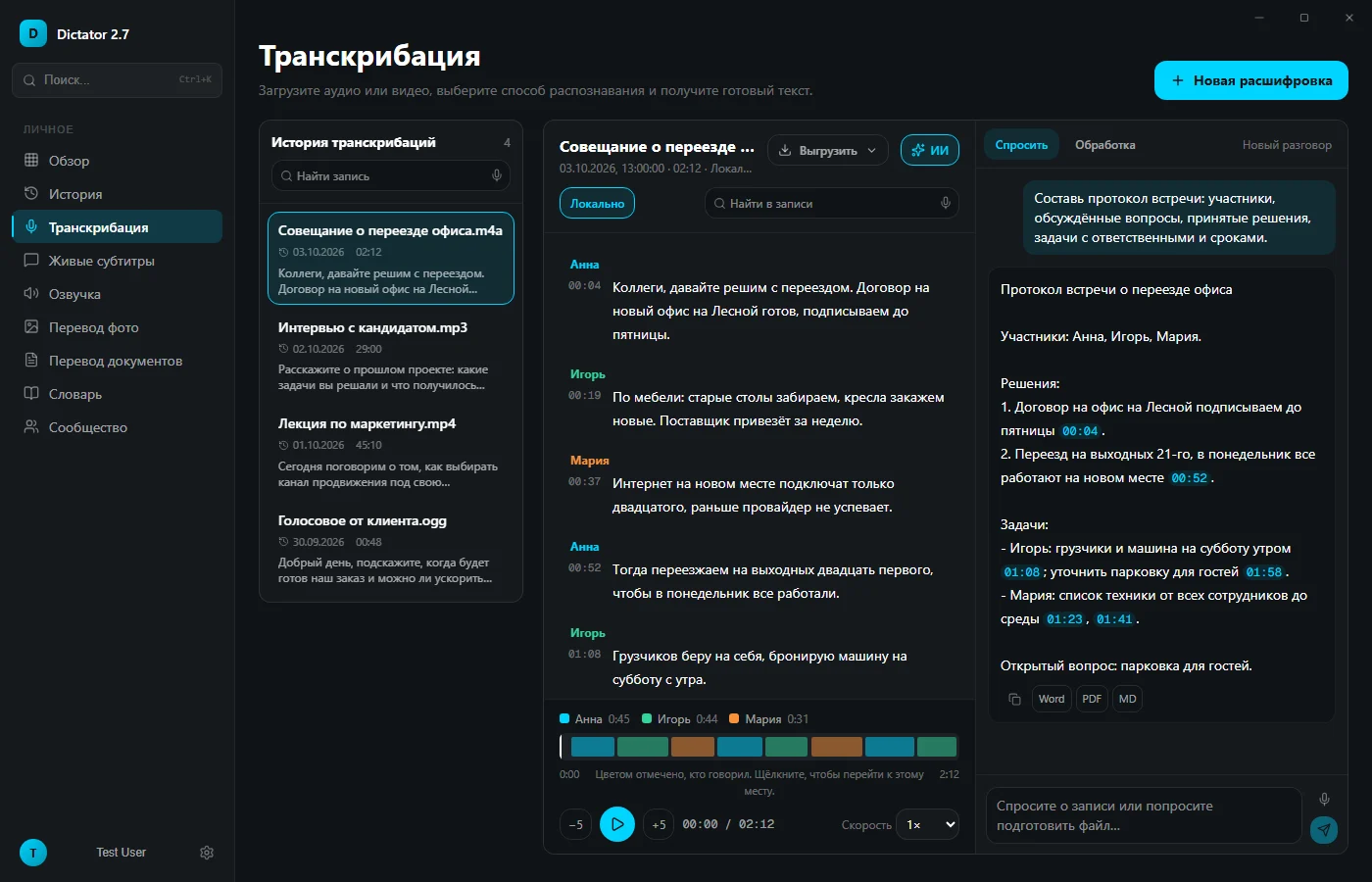
Questions about a recording: ask AI to draft meeting minutes, list tasks or find what a particular person said. Answers link to moments in the recording; clicking a phrase plays the audio from there. Questions use the internet and are available on every plan within its shared cloud-token balance.
Many files: queue up to 50 recordings and the app processes them in order.
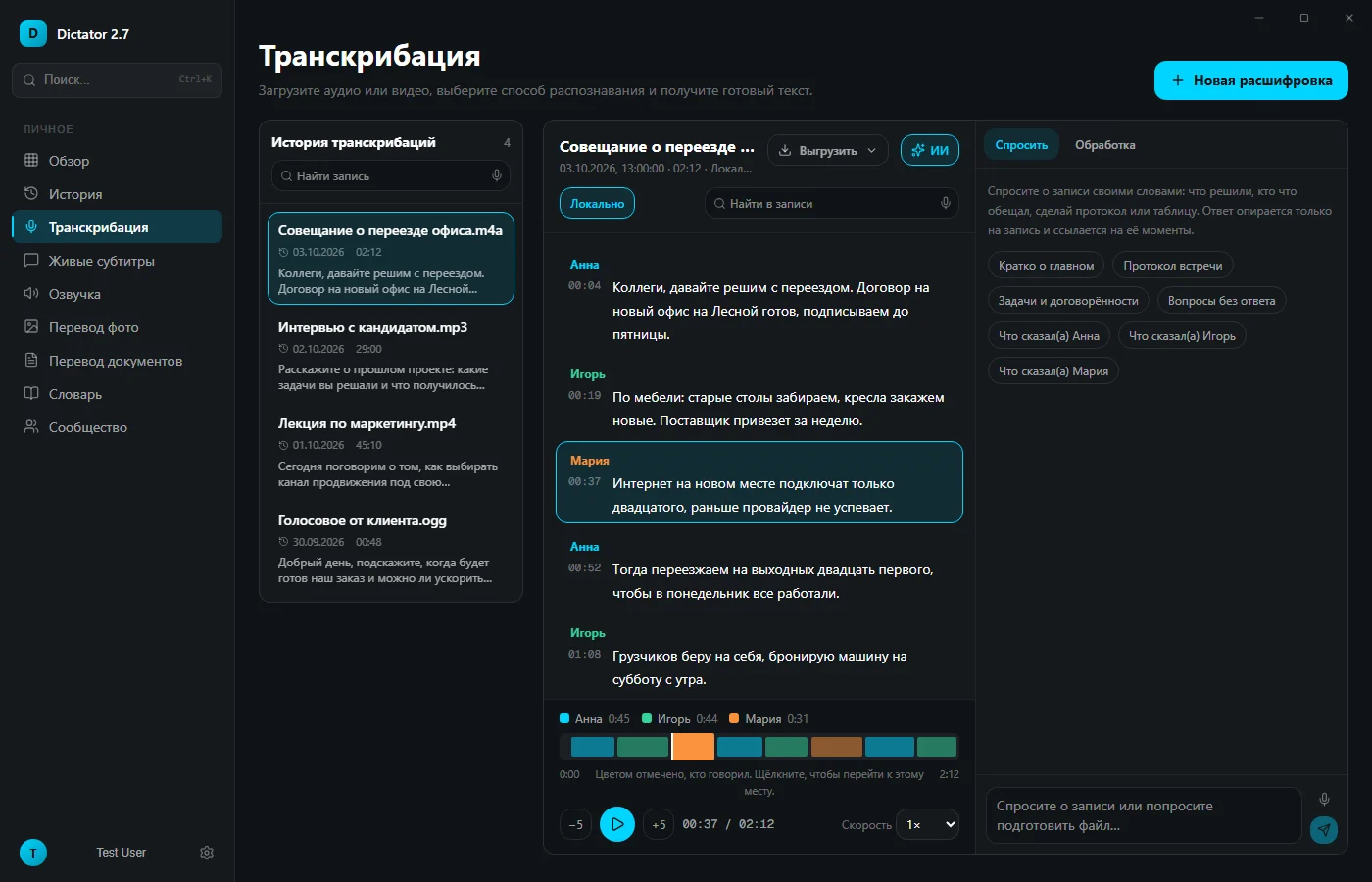
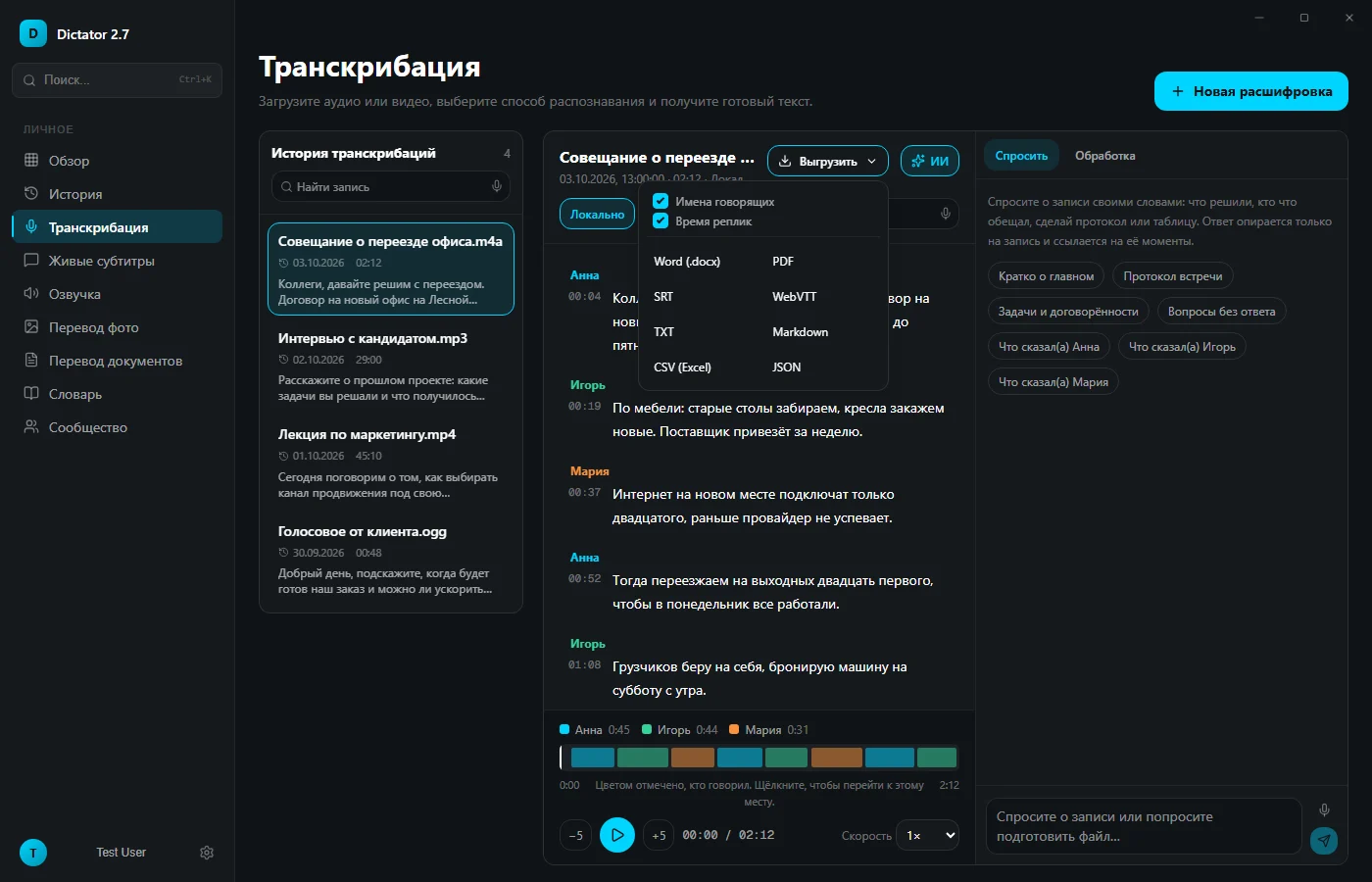
Speakers and time: “Separate speakers” splits the transcript into “Speaker 1,” “Speaker 2” and so on. “Timestamps” adds a time before each turn. Both are available on every plan.
Accuracy: the app transcribed 98–99% of ordinary speech correctly in our measurement, with little change for telephone-quality or noisy recordings. Names, amounts and dates in the business-meeting sample came out without an error.
Calls: the app records other participants’ audio together with your microphone. On Windows it can start automatically when a call begins in Zoom, Teams, Telemost, Skype or Webex, and for Telegram and WhatsApp calls lasting more than 25 seconds. Enable “Turn on captions when a call starts” in Live captions. On macOS, start recording with the button. No bot joins the meeting. The local recording becomes a transcript of you and the other participants, and AI can turn it into meeting minutes.
Other features: voice typing into any app, translated live captions and text to speech. An Android version is available through RuStore.
Best suited to: confidential recordings and regular transcription without paying by the minute.
A Dictator transcript with speaker labels, timestamps and an audio timeline showing how long each person spoke
A short file does not require installation: the online transcription page accepts a recording of up to five minutes and 25 MB without registration, up to three files daily, and does not retain the uploaded file after transcription. For longer recordings, download the app.
An AI-generated meeting protocol in Dictator, with each decision and task linked to a moment in the recording
Speech2Text: an online service with subtitles and Word export
Speech2Text works in the browser. Its offer checked on October 3 included 180 minutes on registration, then 15 minutes daily, with speaker separation, timestamps and DOCX, TXT, PDF and SRT export. Plans started at RUB 500 a month for six hours; pay-as-you-go transcription cost RUB 2 a minute. Recordings are processed on the service’s servers.
Best suited to: a finished Word document or subtitle file directly in the browser.
mymeet.ai: an online meeting assistant
mymeet.ai sends a bot to a call, records it and prepares a report; you can also upload files. Its checked free offer included 180 minutes monthly without a payment card, reports and ten questions in its AI chat. Free meetings became inaccessible after 30 days. Lite cost RUB 1,100 monthly for 500 minutes. Data is processed on servers in Russia.
Best suited to: a bot that joins a Zoom or Teams meeting automatically.
Any2Text: a short file without registration
Any2Text transcribes the first 15 minutes without registration and adds another 60 minutes after registration, once. The checked paid offers were RUB 3.50 a minute or 460 minutes for RUB 460 a month. It exports DOCX, XLSX, SRT and TXT, and lets you choose the number of speakers. Translation and AI summaries required a paid plan starting at RUB 460.
Best suited to: one small file right now, without an account.
TurboScribe: three free files daily
TurboScribe’s checked free plan transcribed three files a day, each up to 30 minutes, with speaker separation and TXT, DOCX and SRT export. Email sign-in is required. Translation and files up to ten hours were included only in Unlimited: $20 monthly or $10 a month billed annually, paid through Stripe.
Best suited to: several half-hour files daily, if paying in US dollars works for you.
Teamlogs: minute packs for companies
Teamlogs gave 15 minutes on registration. You could upload a longer file, but only its first 15 minutes were available free. Paid minute packs started at RUB 10 a minute, or RUB 7 when buying at least 1,000 minutes. Files could be up to 1.5 GB and 300 minutes long, with Russian bank cards accepted. A self-hosted installation is available for companies.
Best suited to: company-funded transcription where minutes are bought in packs.
Buzz: a free open-source app
Buzz transcribes locally for free and works offline once the models are downloaded. It runs on Windows, Linux and Apple Silicon Macs, and exports TXT, SRT and VTT. Free translation targets English; other target languages and AI summaries need a paid API key.
Best suited to: people who want open-source software and are willing to select and download a recognition model themselves.
Why free minutes run out so quickly
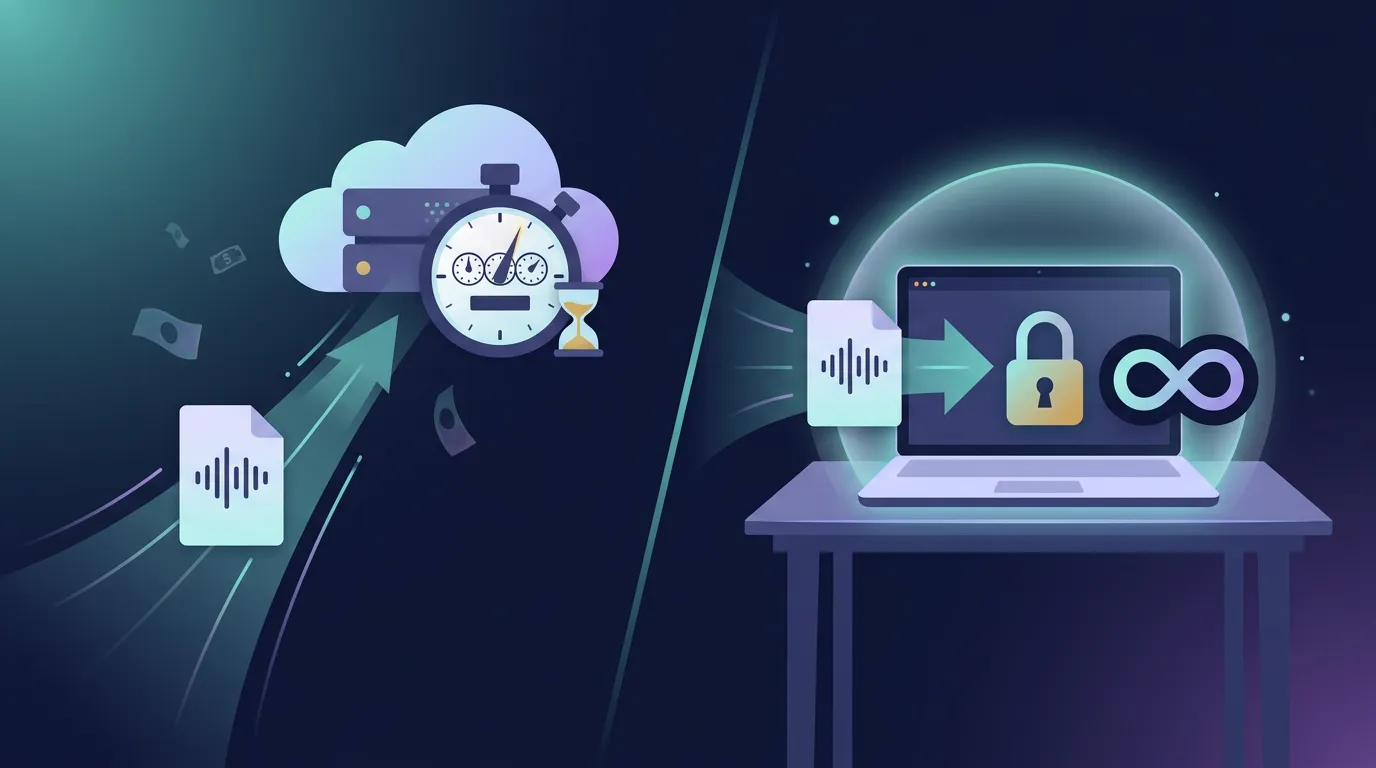
Every recording minute costs an online service money to process on its servers. That is why free access usually means a trial: 15 minutes, 180 minutes once or three files daily. An hour-long interview can use an entire trial, and the recording is uploaded to another company’s server. In Dictator, local recognition transcribes the same hour without spending cloud tokens, regardless of how many local recordings you process that month.
Local software uses your computer for recognition, so it does not sell you server minutes. This is why Dictator has no monthly minute allowance even on Free, and why the recording stays with you. Of the two local apps in this comparison, Dictator also offers voice typing into any window, translated live captions and an Android version.
An online service counts minutes on its server; a local app transcribes on the computer without uploading the recording
Transcribe a recording in Dictator in three steps
Download Dictator for your operating system and install it. Registration is not required for local transcription.
Drag the file into the app. MP3, M4A, WAV, OGG, OPUS, MP4 and MOV are accepted; there is no need to extract a video’s audio first.
Copy or export the transcript in a format available on your platform, separate speakers and translate it if needed. Windows includes TXT, Markdown, Word, PDF, SRT and VTT.
Dictator export options: Word, PDF, SRT, VTT, TXT, Markdown, a spreadsheet and JSON, with optional speaker names and timestamps
How accurately does the app convert audio to text?
We measured Dictator through dictator.my’s online transcription page, which uses a recognition model from the same family as the desktop app. We synthesized two ordinary Russian stories—an office-move announcement and a gardening story—with male and female voices. The samples were prepared as clean audio, telephone-quality audio at 8 kHz and audio with noise. Across the six recordings, 98.8% of words were correct on average; clean and telephone samples were around 99%. Of 225 words, two or three were wrong in the clean and telephone versions, usually grammatical endings, such as a singular phrase in place of a plural one.
When proofreading any transcript, check English names embedded in Russian speech, such as Zoom or CRM, and short abbreviations first. Recognition models infer these from surrounding words.
Which app is best for converting Russian audio to text?
It depends on the recording. For confidential recordings and regular work without counting minutes, Dictator is an option: it transcribed 98–99% of words in ordinary Russian speech correctly in our test, including telephone-quality and noisy samples. Speech2Text is convenient if you want a Word document or subtitles in the browser without installing an app.
Can I convert audio to text for free without a minute allowance?
Online services offer between 15 and 180 free minutes in the plans compared here. Local apps avoid monthly minute allowances: Dictator’s local recognition is unlimited and does not spend cloud tokens, and Buzz offers local transcription.
Can I transcribe offline?
Yes, with software that recognizes speech on your computer. Dictator supports 100 languages locally and does not upload the recording when local recognition is selected.
What does one hour of transcription cost?
At the compared pay-as-you-go prices, one hour cost RUB 120–600: Speech2Text charged RUB 2 a minute without a subscription, Any2Text RUB 3.50 and Teamlogs RUB 10. Dictator does not charge for local recognition minutes or spend cloud tokens on them. Server-side session limits and shared tokens concern cloud recognition, a separate choice; local GPU recognition is unlimited.
How can I separate a transcript by speaker?
Almost every listed service can label turns, but online services include this within their free minute allowances. In Dictator, use “Separate speakers.” Your computer performs the work, free on every plan. The adjacent “Timestamps” switch adds the time before each turn so you can find it in the recording.
Which file format do I need?
Most formats produced by phones, voice recorders and meeting apps work: MP3, M4A, WAV, OGG, OPUS, MP4 and MOV. Pre-conversion is unnecessary; converting M4A to MP3 can only introduce another lossy encoding step.
The original article checked competing providers’ free allowances and prices on October 3, 2026; Dictator’s local/cloud distinction and shared tokens were updated from the product specification on November 16, 2026. For the accuracy measurement, two stories totaling 225 words were synthesized using male and female voices and prepared as six recordings. A separate business-meeting sample contained 118 words, names, amounts and dates. Recognition ran on the dictator.my server. This English edition does not claim a new accuracy test or a new competitor price check.
Who wrote this
BOZEX develops Dictator (dictator.my), an app for offline transcription and voice typing, live captions and text to speech. The original comparison checked providers’ websites and measured recognition accuracy on October 3, 2026. Dictator’s local recognition and shared cloud tokens were checked against the product specification on November 16, 2026.
 Dictator
All articles →