Whisper without the command line: 7 speech recognition apps
You do not have to install OpenAI’s open-source Whisper speech recognition model through Python and a terminal. Desktop apps package it with an installer and a button to download a model. For interviews, lectures and meetings, Dictator (dictator.my) transcribes locally without an internet connection, labels speakers and provides transcript exports. Alongside Whisper, it includes Sber’s GigaAM model for Russian speech, which does not require a graphics card. Local GPU recognition is free and unlimited and does not spend cloud tokens.
We develop Dictator, so its features come from the app’s code and pricing specification. Alice and Perplexity named the other apps in our October 14, 2026 survey about running Whisper without a command line; we also included two interview tools made by researchers. Competing apps’ offers and platform support below are the snapshot checked on their developers’ websites and repositories on October 14, 2026. Dictator’s local/cloud allowances were updated from the repository on November 16.
The table contains seven apps and the original Whisper implementation for reference. All recognize Russian speech and can run offline once their models are downloaded. They differ in supported operating systems, GPU acceleration and speaker labeling.
App
Free offer
Systems in the checked version
GPU support
Speaker labels
Best suited to
Dictator
Unlimited local recognition; no cloud tokens used
Windows, macOS and Linux
NVIDIA, AMD and Intel; Metal on Mac; CPU fallback
Free local separation
Interviews and lectures, including Russian with GigaAM
Buzz
Free, open source
Windows, Linux, macOS; Mac releases after 1.4.5 target Apple Silicon
NVIDIA; other GPUs through Vulkan
Yes
Subtitles and automatic folder transcription
Vibe
Free, open source
Windows, macOS, Linux
NVIDIA, AMD, Intel
Yes
Batches of files and DOCX/PDF export
noScribe
Free, open source
Windows, macOS, Linux
Not found in the description checked
Yes
Research interviews and its built-in editor
aTrain
Free, open source
Windows, Linux
NVIDIA only, with CUDA Toolkit
Yes
Transcripts for MAXQDA, ATLAS.ti and NVivo
MacWhisper
Free version; Pro €64 once in the checked offer
Mac only
Not found in the description checked
Listed among features
A Mac-focused workflow
Subtitle Edit
Free, open source
Windows, macOS, Linux
NVIDIA, Vulkan
Through Crisp ASR
Video subtitles
OpenAI Whisper
Free, open source
Through Python and a terminal
NVIDIA through PyTorch
No
Developers
Every app has a free option; MacWhisper reserves some functions for Pro. Dictator distinguishes unlimited local recognition from metered cloud work. Choose around the recording and your hardware. For Russian speech on a computer without a GPU, GigaAM is an option offered during Dictator’s setup. Try online transcription or download the app.
Which Whisper app fits your task?
Interviews, lectures or meetings, with a finished transcript: Dictator recognizes locally, labels speakers and includes transcript export on every plan.
Russian speech on a computer without a GPU: Dictator with GigaAM, which runs on the CPU. Subtitle Edit also offers GigaAM through Crisp ASR.
An Intel Mac: Dictator or Vibe. The last Buzz version for Intel in the checked release information was 1.4.5.
Open-source software: Buzz or Vibe.
Qualitative research with MAXQDA, ATLAS.ti or NVivo: aTrain.
A Mac-only app with a Mac-focused interface: MacWhisper.
Video subtitles with manual correction: Subtitle Edit.
Recognition integrated into your own code: original Whisper, whisper.cpp or Dictator’s local HTTP API.
Dictator: Whisper and GigaAM without manual setup
Dictator transcribes recordings, types from speech into any app and provides live captions. Whisper recognition runs on your computer; Russian recordings can use GigaAM instead. Download the model with a button during setup.
Local recognition: free and unlimited, without a monthly minute allowance or token charge. Registration is not required for local recognition. The per-session limits shown for server recognition do not turn local GPU recognition into paid cloud work.
Cloud plans: Free provides 1,000 shared tokens a month for enabled cloud functions; Basic provides 20,000 for $5.99 monthly, Pro 46,000 for $12.99, and Premium 100,000 for $29.99. Free includes limited cloud speech recognition within its shared 1,000-token balance. Online AI translation and transcript processing use the same balance, rather than separate character allowances. See current pricing.
Whisper models: seven choices, from Tiny at under 80 MB to Large V3 at nearly 3 GB. The setup flow described in the original article offered a compressed Large V3 Turbo model of 547 MB and hid models that would not fit available GPU memory.
Russian speech: Sber’s GigaAM v3 model is 232 MB. In the developer’s comparison of 295 Russian recordings, it made 18% fewer errors than Whisper. In the original desktop measurement, a 5-minute 43-second recording took 12 seconds on a 12-core Ryzen 9 5900X; a laptop may take longer. This is a specific benchmark, not a promise for every computer.
Graphics processors: NVIDIA, AMD and Intel on Windows, and Metal on Mac. Whisper can use the CPU without a suitable GPU; Small or Base are more practical there.
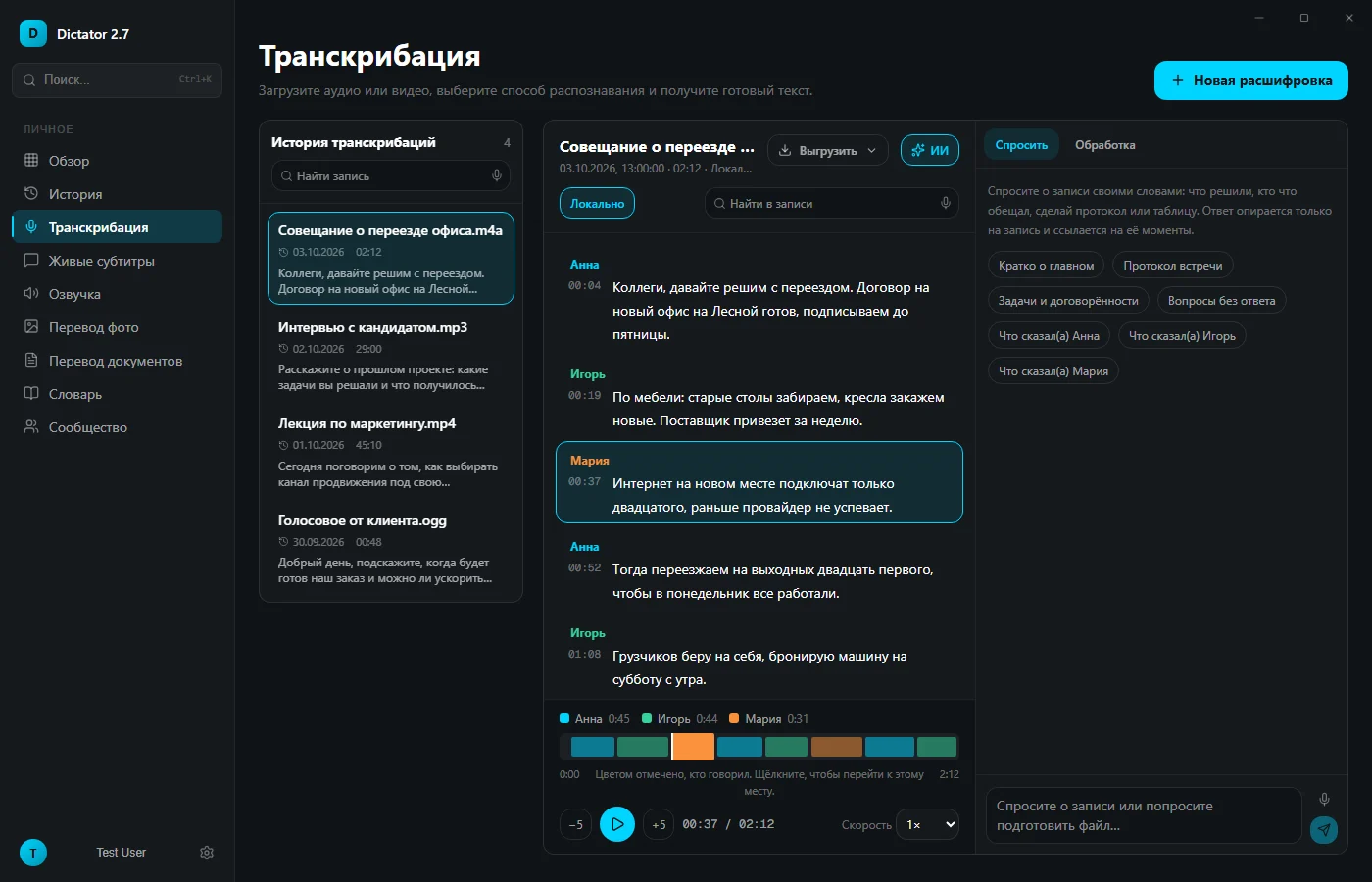
Speakers and time: speaker-labeled turns with timestamps. Separation runs locally and is free on every plan.
Files: MP3, WAV, OGG, M4A, FLAC, MP4, MOV and MKV, plus YouTube links; queue up to 50 files.
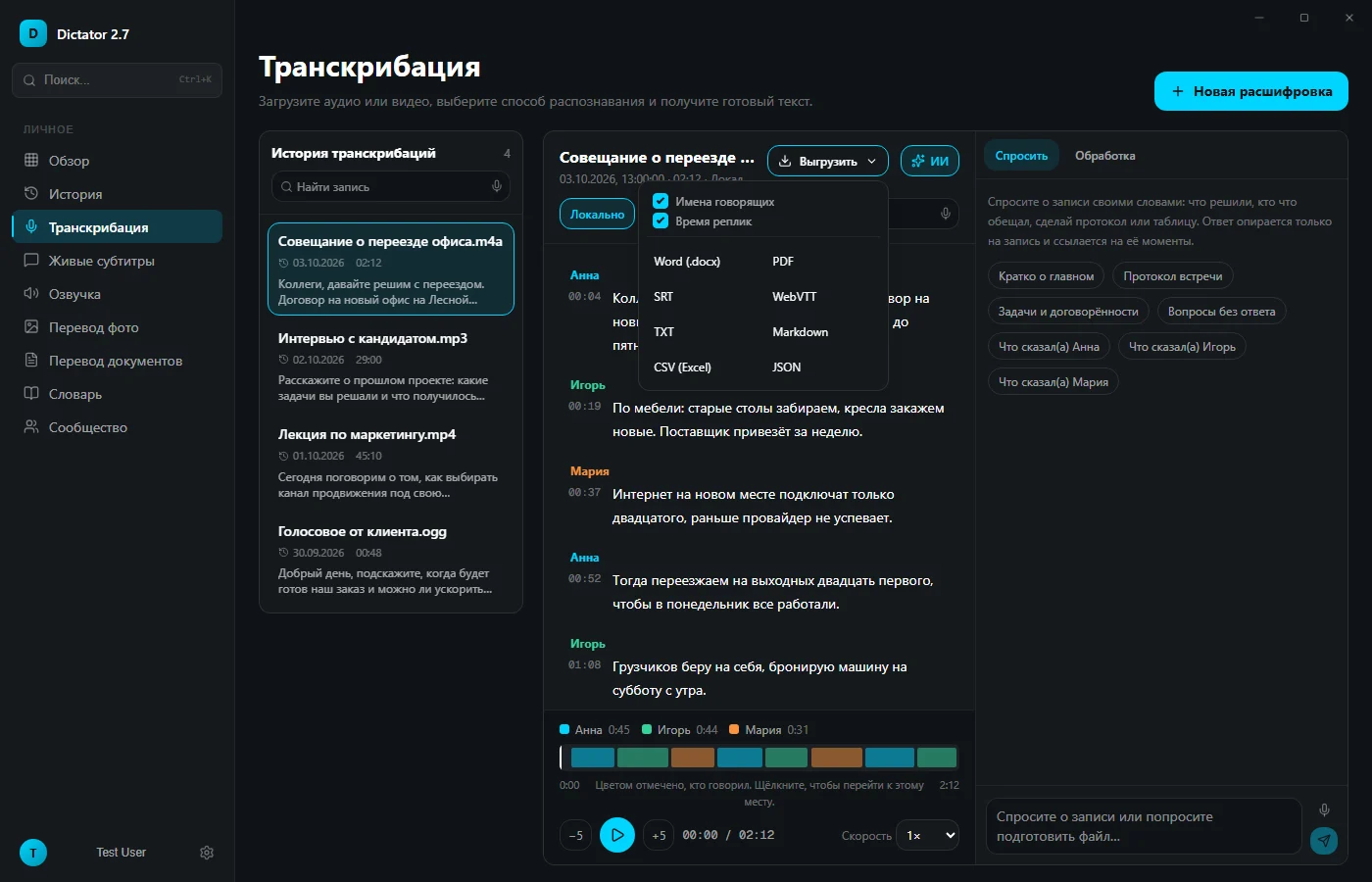
Exports: transcript export is included on every plan. Windows includes Word, PDF, SRT, VTT, TXT, Markdown, CSV and JSON; available export formats depend on platform.
Scripts: a local HTTP API accepts a recording sent to your computer and returns text.
Languages: recognition in 100 languages and an interface in 19 languages, including Russian.
Accuracy: our October 3 test transcribed an average of 98.8% of words in ordinary Russian speech correctly across six clean, telephone-quality and noisy recordings; clean and telephone versions were around 99%.
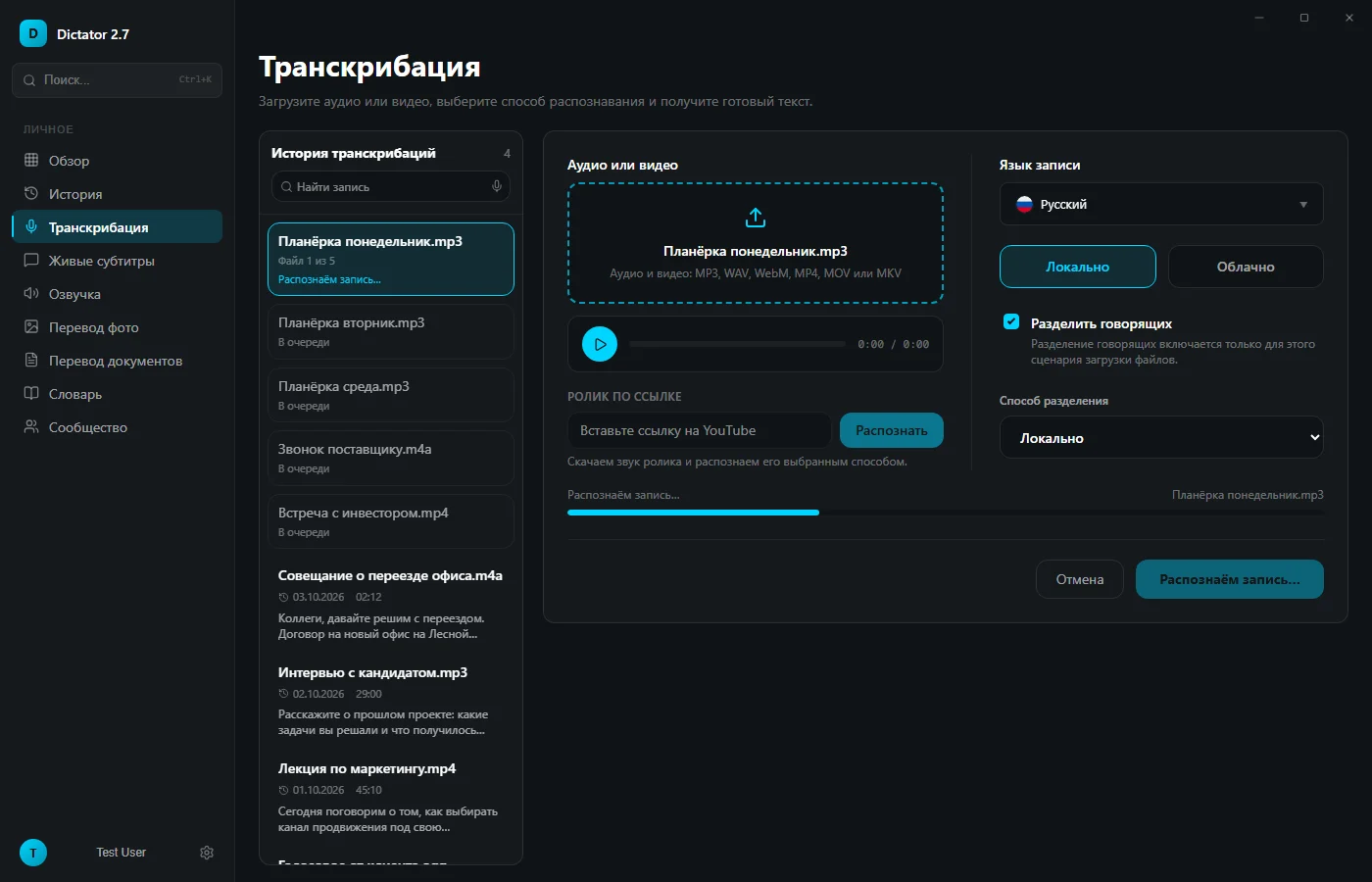
Dictator’s transcription queue with local recognition selected and speaker separation enabled
In our original survey, Perplexity recommended Buzz first for Whisper without a command line. Buzz is free and open source under the MIT license, with a Russian interface available. It transcribes files and YouTube videos, labels speakers, watches a folder for new files and exports TXT, SRT and VTT. NVIDIA acceleration is available, while the whisper.cpp engine also supports other GPUs through Vulkan. The checked Windows installer was unsigned and could trigger a Windows warning. The developer’s release information said future Mac versions would target Apple Silicon; 1.4.5 was the last Intel release.
Best suited to: subtitles and automatic transcription of a watched folder.
Vibe: open source and batch transcription
Vibe is free and open source on Windows, macOS and Linux. In addition to Whisper, the checked version offered Nemotron and Parakeet, speaker labels, linked-video transcription, and SRT, VTT, TXT, HTML, PDF, JSON and DOCX export. It supported NVIDIA, AMD and Intel acceleration.
Best suited to: processing many files when open source matters.
noScribe and aTrain: tools made by researchers
Sociologist Kai Dröge created noScribe for qualitative research interviews and journalism. It is free on Windows, macOS and Linux, labels speakers, supports around 60 languages and includes an editor for reviewing transcripts.
aTrain was developed at the University of Graz. It is available through Microsoft Store or Flathub; the checked Mac releases were older versions. It labels speakers and exports transcripts for MAXQDA, ATLAS.ti and NVivo. GPU support required NVIDIA and an installed CUDA Toolkit. In the developers’ benchmark, the most accurate model took around three times the recording duration on a laptop CPU, and around 20% of its duration with an NVIDIA GPU.
Best suited to: a series of interviews for a research project.
MacWhisper and Subtitle Edit
MacWhisper runs only on Mac. The checked offer included a free version and Pro for a one-time €64 payment with updates. It exported TXT, Markdown, PDF, HTML, DOCX, SRT and VTT.
Subtitle Edit is a free subtitle editor for Windows, macOS and Linux. Recognition is provided through engines including Whisper CPP, Faster Whisper, WhisperX and Crisp ASR; the app downloads the engine and model during setup. Crisp ASR also provides GigaAM and speaker labels. Whisper CPP supports CUDA on NVIDIA and Vulkan on other GPUs.
Best suited to: MacWhisper for a Mac-focused workflow, Subtitle Edit for editing subtitles.
Another name appears often in comparisons: Whisper Desktop. This is an older 64-bit Windows app whose author had not updated it since 2023 in the checked repository. The author explicitly warned that whisperdesktop.com was not affiliated with the project and should not be trusted. Use the project’s GitHub releases rather than a website merely sharing its name.
What does running Whisper through Python involve?
The original implementation installs with pip install -U openai-whisper. Its README checked for the original article listed Python 3.8–3.11, a separate ffmpeg installation, and Rust when no prebuilt tiktoken package was available for the system. A recording is transcribed through a terminal command such as whisper interview.mp3 --language Russian --model turbo.
The original implementation uses PyTorch for GPU acceleration; on Windows the documented route was NVIDIA with CUDA. The checked README listed approximately 10 GB of VRAM for large, 6 GB for turbo and 2 GB for small. Original Whisper does not label speakers; that requires additional tooling such as WhisperX and pyannote models.
The apps in the table handle this setup through a graphical interface, and add speaker labeling around the recognition model.
Do you need a GPU, and which model should you choose?
A GPU is not mandatory, but it can make Whisper much faster. Useful starting points are:
NVIDIA, AMD or Intel GPU: Large V3 Turbo. Dictator and Vibe support all three; the compared original Whisper and aTrain acceleration routes target NVIDIA.
Apple Silicon Mac: Large V3 Turbo with Metal acceleration.
CPU only: Small or Base; for long Russian recordings, consider GigaAM.
English terms inside Russian speech: Whisper handled these better than GigaAM in the comparison described in the original article.
A Dictator interview transcript with speaker labels, timestamps and an audio timeline
Transcribe with Whisper in Dictator in three steps
Download Dictator and install it. During setup, choose a recognition model: Whisper for multiple languages or GigaAM for Russian. The app downloads the selected model.
In Transcription, drag in a file or paste a YouTube link. Set the recording language explicitly where possible, select Local recognition and enable speaker separation when two or more people are speaking.
Use Export for the available document, subtitle and text formats. Include or omit speaker names and turn timestamps as required.
Dictator transcript export with document, subtitle and text formats and options for speaker names and timestamps
Frequently asked questions
Can I use Whisper without Python or a command line?
Yes. Those steps are needed for the original implementation, while Dictator, Buzz, Vibe, noScribe, aTrain, MacWhisper and Subtitle Edit install as regular apps.
Does Whisper need a GPU?
A GPU is useful but optional. aTrain’s developers measured roughly three recording durations for the most accurate model on a laptop CPU. For an hour-long Russian interview without a GPU, GigaAM can be a practical alternative.
Which Whisper model is best for Russian?
Large V3 Turbo is a starting point with a GPU; Small may be more practical on a less powerful laptop. Models ending in .en are English-only and do not recognize Russian.
Does Whisper work offline?
Yes. Download the model first, then Dictator can use local recognition with Wi-Fi disabled.
Can Whisper distinguish speakers?
The model itself outputs text. Apps add speaker labeling: Dictator, Buzz, Vibe, noScribe, aTrain and Subtitle Edit through Crisp ASR. Dictator’s local speaker separation is free on every plan.
Why does Whisper add phrases such as “To be continued” at the end?
On long silence, the model can hallucinate subtitle-like phrases from its training data, such as “To be continued” or a subtitle credit. Removing silence before recognition helps. Dictator uses Silero to identify speech; GigaAM provides another option for Russian recordings.
Which is more accurate for Russian, Whisper or GigaAM?
The original comparison favored GigaAM for Russian speech without a GPU, while Whisper handled English names within Russian phrases better. Dictator offers both, and Subtitle Edit provides GigaAM through Crisp ASR. Accuracy depends on the recording and model configuration.
Are Whisper Desktop and whisperdesktop.com the same project?
No. The Whisper Desktop author warns in the project’s GitHub repository that the website impersonates the project. The app itself had not been updated since 2023 in the repository checked for the original article.
Competing apps and the original Whisper requirements were checked on developers’ websites and GitHub repositories on October 14, 2026. Dictator’s current local/cloud allowances were checked against its product specification on November 16, 2026. The accuracy measurement took place on October 3: two ordinary Russian stories totaling 225 words were synthesized with male and female voices, prepared as six clean, telephone-quality and noisy recordings, and recognized by Whisper on the dictator.my server. More reading: audio-to-text software, free transcription and online transcription.
Who wrote this
BOZEX develops Dictator (dictator.my), which transcribes with Whisper and GigaAM locally, types from speech and provides live captions. Competing apps were checked on their websites and GitHub repositories on October 14, 2026. Dictator’s local recognition and token allowances were checked against the product specification on November 16, 2026.
 Dictator
All articles →